Floppy disk: Difference between revisions
imported>Comp.arch mNo edit summary |
imported>Quindraco No edit summary |
||
| Line 5: | Line 5: | ||
[[File:Floppy Disk Drives 8 5 3.jpg|thumb|8-inch, 5¼-inch (full height), and 3½-inch drives]] | [[File:Floppy Disk Drives 8 5 3.jpg|thumb|8-inch, 5¼-inch (full height), and 3½-inch drives]] | ||
[[File:Image3,5''-Diskette removed.jpg|thumbnail|A 3½-inch floppy disk removed from its housing]] | [[File:Image3,5''-Diskette removed.jpg|thumbnail|A 3½-inch floppy disk removed from its housing]] | ||
{{Memory types}} | |||
A '''floppy disk''', '''diskette''', or '''floppy diskette''' (casually known as a '''floppy''' or a '''disk''') is a type of [[disk storage]] made from a thin, flexible disk coated with a [[magnetic storage]] medium. It is enclosed in a square or nearly square plastic shell lined with fabric to help remove dust from the spinning disk. Floppy disks store [[digital data]], which can be read or written when inserted into a '''floppy disk drive''' ('''FDD''') connected to or built into a [[computer]] or other device.<ref name="Auto2Y-1" /> The three most popular formats of floppy disks (and their drives) are the 8-inch, 5¼-inch, and 3½-inch versions.<ref name="Mee" /><ref name="Auto2Y-2" /> | |||
The first floppy disks, invented and made by [[IBM]] in 1971,<ref name="computerhistory.org" /> had a disk diameter of {{convert|8|in|mm|1}}.<ref name="Teja_1985" /> Subsequently, the 5¼-inch (130 mm) and then the 3½-inch (90 mm) became a ubiquitous form of data storage and transfer into the first years of the 21st century.<ref name="Fletcher" /> By the end of the 1980s, 5¼-inch disks had been superseded by 3½-inch disks. During this time, PCs frequently came equipped with drives of both sizes. By the mid-1990s, 5¼-inch drives had virtually disappeared, as the 3½-inch disk became the predominant floppy disk. The advantages of the 3½-inch disk were its higher capacity, its smaller physical size, and its rigid case which provided better protection from dirt and other environmental risks. | |||
Floppy disks were so common in late 20th-century culture that many electronic and software programs continue to use save icons that look like floppy disks well into the 21st century, as a form of [[Skeuomorph#Virtual examples|skeuomorphic design]]. While floppy disk drives still have some limited uses, especially with [[legacy system|legacy industrial computer equipment]], they have been superseded by data storage methods with much greater data storage capacity and [[Computer data storage#Performance|data transfer speed]], such as [[USB flash drive]]s, [[memory card]]s, [[optical disc]]s, and storage available through local [[computer network]]s and [[cloud storage]]. | Floppy disks were so common in late 20th-century culture that many electronic and software programs continue to use save icons that look like floppy disks well into the 21st century, as a form of [[Skeuomorph#Virtual examples|skeuomorphic design]]. While floppy disk drives still have some limited uses, especially with [[legacy system|legacy industrial computer equipment]], they have been superseded by data storage methods with much greater data storage capacity and [[Computer data storage#Performance|data transfer speed]], such as [[USB flash drive]]s, [[memory card]]s, [[optical disc]]s, and storage available through local [[computer network]]s and [[cloud storage]]. | ||
==History== | == Categories == | ||
{{Main|List of floppy disk formats}} | |||
Industry observers categorize floppy disks and floppy disk drives according to size and capacity with four major categories being 8-inch, 5¼-inch, 3½-inch and high-capacity floppy disks and floppy disk drives.<ref name="Mee" /><ref name="Auto2Y-64" /><ref name="Porter94" /> | |||
There were in addition variant products that did not fit these categories. The distinguishing characteristic between the high-capacity products and their lower capacity brethren, frequently categorized as standard floppies<ref name="Auto2Y-65" /> was the use of [[servomechanism]]s to increase the number of tracks and thereby increase capacity.<ref name="Mee" /><ref name="Auto2Y-66" /> | |||
The four categories each represented generations, from the beginning each generation had substantially greater market success from the previous and it ultimately succeeded the previous one, but the high-capacity floppy generation although having some success was never as successful as the prior 3½-inch generation<ref name="Porter94" /> and become essentially obsolete by 2011<ref name="Auto2Y-67" /> | |||
While the original IBM 8-inch disk was actually so defined, the other sizes are defined in the metric system, their usual names being but rough approximations.{{Refn | {{Citation | title = X3.162 | date = 1994 | publisher = ANSI | url = https://webstore.ansi.org/Standards/INCITS/ANSIX31621988R1994 | quote = Information Systems – Unformatted Flexible Disk Cartridge for Information Interchange, 5.25 in (130 mm), 96 Tracks per inch (3.8 Tracks per Millimeter), General, Physical, and Magnetic Requirements (includes ANSI X3.162/TC-1-1995) Specifies the general, physical, and magnetic requirements for interchangeability for the two-sided, 5.25 in (130 mm) flexible disk cartridge | access-date = 28 February 2022 | archive-date = 28 February 2022 | archive-url = https://web.archive.org/web/20220228185002/https://webstore.ansi.org/Standards/INCITS/ANSIX31621988R1994 | url-status = dead }}}} | |||
Different sizes of floppy disks are mechanically incompatible, and disks can fit only one size of drive. Drive assemblies with both 3½-inch and 5¼-inch slots were available during the transition period between the sizes, but they contained two separate drive mechanisms. In addition, there are many subtle, usually software-driven incompatibilities between the two. 5¼-inch disks formatted for use with Apple II computers would be unreadable and treated as unformatted on a Commodore,<ref name="Auto2Y-68" /> As [[computer platforms]] began to form, attempts were made at interchangeability. Apple's later 1.44 MB high-density 3½-inch drives (marketed as the SuperDrive) could read, write, and format IBM PC–compatible floppy disks. However, few IBM-compatible computers were able to read or write Apple-formatted floppy disks. The limitation was due not to the 3½-inch drive mechanism itself, but to the disk controller and its lack of support for Apple's GCR (Group Coded Recording) encoding used on 400 kB and 800 kB Macintosh disks.<ref>{{cite web |title=Apple Floppy Drives – Apple II / Macintosh |url=https://mirrors.apple2.org.za/ftp.apple.asimov.net/documentation/hardware/storage/disks/apple_floppy_disk_drives.pdf |publisher=Apple II Documentation Project |quote=GCR disks cannot be read by standard PC disk controllers. |access-date=1 November 2025}}</ref> | |||
8-inch, 5¼-inch and 3½-inch drives were manufactured in a variety of sizes, most to fit standardized [[drive bay]]s. Alongside the common disk sizes were [[floppy disk variants|non-classical sizes]] for specialized systems. | |||
== History == | |||
{{Main|History of the floppy disk}} | {{Main|History of the floppy disk}} | ||
[[File:Floppy Disk Drive 8 inch.jpg|thumb|8-inch floppy disk,<br /> inserted in drive,<br />(3½-inch floppy diskette,<br /> in front, shown for scale)]] | |||
[[File:Floppy Disk Drive 8 inch.jpg|thumb | |||
[[File:Floppy | === 8-inch === | ||
[[File:8-inch floppy disk - IZOT, Bulgaria.jpg|thumb|upright|8-inch floppy disk]] | |||
The first commercial floppy disks, developed in the late 1960s, were {{convert|8|in|mm|1}} in diameter;<ref name="Teja_1985" /><ref name="Fletcher" /> they became commercially available in 1971 as a component of IBM products and both drives and disks were then sold separately starting in 1972 by [[Memorex]] and others.<ref name="Auto2Y-3" /> These disks and associated drives were produced and improved upon by [[IBM]] and other companies such as Memorex, [[Shugart Associates]], and [[Burroughs Corporation]].<ref name="Auto2Y-4" /> The term "floppy disk" appeared in print as early as 1970,<ref name="Auto2Y-5" /> and although IBM announced its first media as the ''Type 1 Diskette'' in 1973, the industry continued to use the terms "floppy disk" or "floppy". | |||
Floppy disks of the first standard are 8 inches in diameter,<ref name="Teja_1985" /> protected by a flexible plastic jacket. It was a read-only device used by IBM as a way of loading [[microcode]].<ref name="Auto2Y-6" /> Read/write floppy disks and their drives became available in 1972, but it was IBM's 1973 introduction of the [[IBM 3740|3740 data entry system]]<ref name="Auto2Y-7" /> that began the establishment of floppy disks, called by IBM the ''Diskette 1'', as an industry standard for information interchange. Diskettes formatted for this system stored 242,944 bytes.<ref name="Auto2Y-8" /> Early [[microcomputer]]s used for engineering, business, or word processing often used one or more 8-inch disk drives for removable storage; the [[CP/M]] operating system was developed for microcomputers with 8-inch drives.<ref name="Kildall_1980_CPM" /> | |||
The family of 8-inch disks and drives increased over time and later versions could store up to 1.2 MB;<ref name="Auto2Y-9" /> many microcomputer applications did not need that much capacity on one disk, so a smaller size disk with lower-cost media and drives was feasible. The 5¼-inch drive succeeded the 8-inch size in many applications,<ref name="Auto2Y-10" /> and developed to the same storage capacity as the larger 8-inch size, using higher-density media and recording techniques. | |||
=== 5¼-inch === | |||
{{multiple image | |||
| total_width = 400 | |||
| image1 = 5.25 inch floppy disk, front and back.jpg | |||
| caption1 = 5¼-inch floppies, front and back | |||
| image2 = 5.25 in. floppy disk drive top.jpg | |||
| caption2 = Uncovered 5¼‑inch disk mechanism with disk inserted | |||
}} | |||
In 1976, Shugart Associates introduced the 5¼-inch floppy disk drive. By 1978, there were more than ten manufacturers producing such drives.<ref name="Auto2Y-11" /> There were competing [[floppy disk format]]s, with hard- and soft-sector versions and encoding schemes such as [[differential Manchester encoding]] (DM), [[modified frequency modulation]] (MFM), [[Modified frequency modulation#MMFM|M<sup>2</sup>FM]] and [[group coded recording]] (GCR). The 5¼-inch format displaced the 8-inch one for most uses, and the hard-sectored disk format disappeared. The most common capacity of the 5¼-inch format in DOS-based PCs was 360 KB (368,640 bytes) for the Double-Sided Double-Density (DSDD) format using MFM encoding.<ref name="Auto2Y-12" /> | |||
In 1984, IBM introduced with its [[IBM Personal Computer/AT|PC/AT]] the 1.2 MB (1,228,800 bytes) dual-sided 5¼-inch floppy disk, but it never became very popular. IBM started using the 720 KB [[double density]] 3½-inch microfloppy disk on its [[IBM PC Convertible|Convertible]] laptop computer in 1986 and the 1.44 MB (1,474,560 bytes) [[High-density storage media|high-density]] version with the [[IBM Personal System/2]] (PS/2) line in 1987. These disk drives could be added to older PC models. In 1988, Y-E Data introduced a drive for 2.88 MB Double-Sided Extended-Density (DSED) diskettes which was used by IBM in its top-of-the-line PS/2 and some [[IBM RS/6000|RS/6000]] models and in the second-generation [[NeXTcube]] and [[NeXTstation]]; however, this format had limited market success due to lack of standards and movement to 1.44 MB drives.<ref name="Auto2Y-13" /> | |||
Throughout the early 1980s, limits of the 5¼-inch format became clear. Originally designed to be more practical than the 8-inch format, it was becoming considered too large; as the quality of recording media grew, data could be stored in a smaller area.<ref name="Jarrett" /> Several solutions were developed, with drives at 2-, 2½-, 3-, 3¼-,<ref name="Auto2Y-14" /> 3½- and 4-inches (and [[Sony]]'s {{convert|90|x|94|mm|in|2|abbr=on}} disk) offered by various companies.<ref name="Jarrett" /> They all had several advantages over the old format, including a rigid case with a sliding metal (or later, sometimes plastic) shutter over the head slot, which helped protect the delicate magnetic medium from dust and damage, and a sliding [[write protection]] tab, which was far more convenient than the adhesive tabs used with earlier disks. The established market for the 5¼-inch format made it difficult for these mutually incompatible new formats to gain significant market share.<ref name="Jarrett" /> A variant on the Sony design, introduced in 1983 by many manufacturers, was then rapidly adopted. By 1988, the 3½-inch was outselling the 5¼-inch.<ref name="Auto2Y-15" /> | |||
The head gap of an 80‑track high-density (1.2 MB in the [[Modified Frequency Modulation|MFM]] format) 5¼‑inch drive (a.k.a. ''mini diskette'', ''Mini disk'', or ''[[Shugart Associates|Minifloppy]]''){{cn|date=August 2025}} is smaller than that of a 40‑track double-density (360 KB if double-sided) drive but can also format, read and write 40‑track disks provided the controller supports double stepping or has a switch to do so. A blank 40‑track disk formatted and written on an 80‑track drive can be taken to its native drive without problems, and a disk formatted on a 40‑track drive can be used on an 80‑track drive. Disks written on a 40‑track drive and then updated on an 80 track drive become unreadable on any 40‑track drives due to track width incompatibility.<ref name="Auto2Y-16" />{{dead link|date=August 2025}} | |||
Single-sided disks were coated on both sides.<ref name="Auto2Y-17" /> The reason usually given for the higher price was that double sided disks were certified error-free on both sides of the media. Double-sided disks could be used in some drives for single-sided disks, as long as an index signal was not needed. This was done one side at a time, by turning them over ([[flippy disk]]s); more expensive dual-head drives which could read both sides without turning over were later produced, and eventually became used universally.<ref name="Auto2Y-18" /> | |||
=== 3½-inch === | |||
[[File:Floppy disk internal diagram 8.svg|thumb |right |330px | |||
|alt=Internal parts of a 3½-inch floppy disk | |||
|Internal parts of a 3½-inch floppy disk.<br /> | |||
<span style="display:block; line-height:1.1; margin-top:0.25em;"> | |||
1) Hole indicates a high-capacity disk.<br /> | |||
2) Hub engages with the drive motor.<br /> | |||
3) Shutter protects the surface.<br /> | |||
4) Plastic housing.<br /> | |||
5) Polyester sheet reduces friction.<br /> | |||
6) Magnetic-coated plastic disk.<br /> | |||
7) Schematic of one sector (tracks/sectors not visible on real disks).<br /> | |||
8) [[Write protection]] tab. | |||
</span>]] | |||
In the early 1980s, many manufacturers introduced smaller floppy drives and media in various formats.<ref name="microcomputing198308_barbier" /> A consortium of 21 companies eventually settled on a 3½-inch design known as the ''Micro diskette'', ''Micro disk'', or ''Micro floppy'', similar to a [[Sony]] design but improved to support both single-sided and double-sided media, with formatted capacities generally of 360 KB and 720 KB respectively. Single-sided drives of the consortium design first shipped in 1983,<ref name="Auto2Y-19" /> and double-sided in 1984. The double-sided, high-density 1.44 MB (actually 1440 KiB = 1.41 MiB or 1.47 MB) disk drive, which would become the most popular, first shipped in 1986.<ref name="Auto2Y-20" /> The first [[Macintosh 128K|Macintosh]] computers used single-sided 3½-inch floppy disks, but with 400 KB formatted capacity. These were followed in 1986 by double-sided 800 KB floppies. The higher capacity was achieved at the same recording density by varying the disk-rotation speed with head position so that the linear speed of the disk was closer to constant. Later Macs could also read and write 1.44 MB HD disks in PC format with fixed rotation speed. Higher capacities were similarly achieved by Acorn's [[RISC OS]] (800 KB for DD, 1,600 KB for HD) and [[AmigaOS]] (880 KB for DD, 1,760 KB for HD).<!-- Apparently Amiga used ''low'' density floppies spun at half the speed that IBM compatibles used? --> | |||
Most 3½-inch disks have a rectangular hole in one corner which, if obstructed, write-enables the disk. A sliding detented piece can be moved to block or reveal the part of the rectangular hole that is sensed by the drive. The HD 1.44 MB disks have a second, unobstructed hole in the opposite corner that identifies them as being of that capacity.<ref name="Auto2Y-21" /> | |||
In IBM-compatible PCs, higher-density 3½-inch floppy drives can read lower-density media, but writing and formatting across densities has reliability issues and was not officially supported by manufacturers.<ref name="Auto2Y-22" /> Writing at different densities than those at which disks were intended, sometimes by altering the density detection hole, was possible but not supported by manufacturers. A hole on one side of a 3½-inch disk can be altered to make some disk drives and operating systems treat the disk as one of higher or lower density, for bidirectional compatibility or economic reasons.<ref name="Auto2Y-23" /> Some computers, such as the [[PS/2]] and [[Acorn Archimedes]], ignored these holes altogether.<ref name="Auto2Y-24" /> | |||
Generally, the term floppy disk persisted, even though later style floppy disks have a rigid case around an internal floppy disk. | Generally, the term floppy disk persisted, even though later style floppy disks have a rigid case around an internal floppy disk. | ||
==={{anchor|HCFD}}High-capacity=== | |||
<!--this is just a place holder, I intend to add to this section in my next editing round --> | |||
A number of attempts were made by various companies to introduce newer floppy-disk formats, frequently characterized as a "'''super floppy,'''" with many based on the standard 3½-inch physical form while offering much higher capacity. Many of these products provide the ability to read and write standard DD and HD disks.<ref name="PCMagEnc">{{cite web | |||
|url=https://www.pcmag.com/encyclopedia/term/super-floppy |title=super floppy |website=PCMag Encyclopedia |publisher=The Computer Language Co Inc |access-date=May 31, 2023}}</ref> None of these ever reached the point where it could be assumed that every current PC would have one, and they were later largely replaced first by [[optical disc]] burners and then by [[flash memory|flash storage]]. | |||
=== | In 1990,<ref name="MB20">{{cite news |newspaper=PC Week |date=October 15, 1990 |page=21 |author=Kristina B. Sullivan |title=Researchers Press for 20M-Byte Floppy Standards}}</ref> an attempt was made to standardize details for a 20MB 3½-inch format floppy. At the time, "three different technologies that are not interchangeable" existed. One major goal was that the to-be-developed standard drive be [[Backward compatibility|backward compatible]]: that it be able to read 720 KB and 1.44 MB floppies. | ||
[[ | <!---Not sure where this goes | ||
Nevertheless, the 5¼- and 3½-inch sizes remain to this day as the standards for [[drive bay]]s in [[computer case]]s, the former used for optical drives (including [[Blu-ray Disc|Blu-ray]]), and the latter for [[hard disk drive]]s. | |||
---> | |||
=== Variants === | |||
{{Main|Floppy disk variants}} | |||
Other smaller floppy sizes were proposed, especially for portable or pocket-sized devices that needed a smaller storage device. | |||
* [[Tabor Drivette|3¼-inch floppies]] otherwise similar to 5¼-inch floppies were proposed by [[Tabor Corporation|Tabor]] and [[Dysan]]. | |||
* Three-inch disks similar in construction to 3½-inch were manufactured and used for a time, particularly by [[Amstrad#Computer product lines|Amstrad]] computers and word processors. | |||
* A two-inch nominal size known as the [[Video Floppy]] was introduced by Sony for use with its Mavica still video camera.<ref name="Auto2Y-69" /> | |||
* An incompatible two-inch floppy produced by Fujifilm called the LT-1 was used in the [[Zenith Minisport]] portable computer.<ref name="Auto2Y-70" /> | |||
None of these sizes achieved much market success.<ref name="Auto2Y-71" /> | |||
=== Obsolescence === | |||
[[File:Disk-cleaning-kit-front-and-rear.jpg|thumb|Front and rear of a retail 3½-inch and 5¼-inch floppy disk drive cleaning kit, as sold in Australia at retailer Big W, circa early 1990s]] | [[File:Disk-cleaning-kit-front-and-rear.jpg|thumb|Front and rear of a retail 3½-inch and 5¼-inch floppy disk drive cleaning kit, as sold in Australia at retailer Big W, circa early 1990s]] | ||
[[File:Different types of storage components.jpg|thumb|A collection of removable data storage media: Floppy disks, [[flash memory]] media, [[Magnetic-tape data storage|tape-based media]], and [[Optical storage|optical discs]]]] | [[File:Different types of storage components.jpg|thumb|A collection of removable data storage media: Floppy disks, [[flash memory]] media, [[Magnetic-tape data storage|tape-based media]], and [[Optical storage|optical discs]]]] | ||
| Line 50: | Line 112: | ||
Flash-based [[USB thumb drive]]s finally provided a practical and popular replacement that supported traditional file systems and all common usage scenarios of floppy disks. As opposed to other solutions, no new drive type or special software was required that impeded adoption, since all that was necessary was an already common [[USB port]]. | Flash-based [[USB thumb drive]]s finally provided a practical and popular replacement that supported traditional file systems and all common usage scenarios of floppy disks. As opposed to other solutions, no new drive type or special software was required that impeded adoption, since all that was necessary was an already common [[USB port]]. | ||
===Usage in the 21st century=== | === Usage in the 21st century === | ||
[[File:Floppy hardware emulator.jpg|thumb|left|A [[Floppy disk hardware emulator|floppy hardware emulator]], same size as a 3½-inch drive, provides a USB interface to the user.]] | [[File:Floppy hardware emulator.jpg|thumb|left|A [[Floppy disk hardware emulator|floppy hardware emulator]], same size as a 3½-inch drive, provides a USB interface to the user.]] | ||
In 2002, most manufacturers still provided floppy disk drives as standard equipment to meet user demand for [[Sneakernet|file transfer]] and an emergency boot device, as well as for the general secure feeling of having the familiar device.<ref | In 2002, most manufacturers still provided floppy disk drives as standard equipment to meet user demand for [[Sneakernet|file transfer]] and an emergency boot device, as well as for the general secure feeling of having the familiar device.<ref name="Auto2Y-25" /> By this time, the retail cost of a floppy drive had fallen to around $20 ({{Inflation|US|20|2002|fmt=eq}}), so there was little financial incentive to omit the device from a system. Subsequently, enabled by the widespread support for USB flash drives and BIOS boot, manufacturers and retailers progressively reduced the availability of floppy disk drives as standard equipment. In February 2003, [[Dell]], one of the leading personal computer vendors, announced that floppy drives would no longer be pre-installed on [[Dell Dimension]] home computers, although they were still available as a selectable option and purchasable as an aftermarket [[Original equipment manufacturer|OEM]] add-on.<ref name="Auto2Y-26" /> By January 2007, only 2% of computers sold in stores contained built-in floppy disk drives.<ref name="PCW" /> | ||
Floppy disks are used for emergency boots in aging systems lacking support for other [[boot disk|bootable media]] and for [[BIOS]] updates, since most BIOS and [[firmware]] programs can still be executed from [[Boot disk#Boot floppies|bootable floppy disks]]. If BIOS updates fail or become corrupt, floppy drives can sometimes be used to perform a recovery. The music and theatre industries still use equipment requiring standard floppy disks (e.g. synthesizers, samplers, drum machines, sequencers, and [[lighting control console|lighting consoles]]). Industrial automation equipment such as programmable [[Machine industry|machinery]] and [[industrial robot]]s may not have a USB interface; data and programs are then loaded from disks, damageable in industrial environments. This equipment may not be replaced due to cost or requirement for continuous availability; existing software emulation and [[virtualization]] do not solve this problem because a customized operating system is used that has no [[device driver|drivers]] for USB devices. [[Floppy disk hardware emulator|Hardware floppy disk emulators]] can be made to interface [[floppy-disk controller]]s to a USB port that can be used for flash drives. | Floppy disks are used for emergency boots in aging systems lacking support for other [[boot disk|bootable media]] and for [[BIOS]] updates, since most BIOS and [[firmware]] programs can still be executed from [[Boot disk#Boot floppies|bootable floppy disks]]. If BIOS updates fail or become corrupt, floppy drives can sometimes be used to perform a recovery. The music and theatre industries still use equipment requiring standard floppy disks (e.g. synthesizers, samplers, drum machines, sequencers, and [[lighting control console|lighting consoles]]). Industrial automation equipment such as programmable [[Machine industry|machinery]] and [[industrial robot]]s may not have a USB interface; data and programs are then loaded from disks, damageable in industrial environments. This equipment may not be replaced due to cost or requirement for continuous availability; existing software emulation and [[virtualization]] do not solve this problem because a customized operating system is used that has no [[device driver|drivers]] for USB devices. [[Floppy disk hardware emulator|Hardware floppy disk emulators]] can be made to interface [[floppy-disk controller]]s to a USB port that can be used for flash drives. | ||
In May 2016, the United States [[Government Accountability Office]] released a report that covered the need to upgrade or replace legacy computer systems within federal agencies. According to this document, old [[IBM Series/1]] minicomputers running on [[#8.0|8-inch floppy disk]]s are still [[nuclear command and control|used to coordinate]] "the operational functions of the United States' nuclear forces". The government planned to update some of the technology by the end of the 2017 fiscal year.<ref name=":0" | In May 2016, the United States [[Government Accountability Office]] released a report that covered the need to upgrade or replace legacy computer systems within federal agencies. According to this document, old [[IBM Series/1]] minicomputers running on [[#8.0|8-inch floppy disk]]s are still [[nuclear command and control|used to coordinate]] "the operational functions of the United States' nuclear forces". The government planned to update some of the technology by the end of the 2017 fiscal year.<ref name=":0" /><ref name="thehill-20160525" /> The update was completed in June 2019<ref>{{cite report |url= https://www.nytimes.com/2019/10/24/us/nuclear-weapons-floppy-disks.html | ||
|title=Update Complete: U.S. Nuclear Weapons No Longer Need Floppy Disks |last=Stack |first=Liam |date=October 24, 2019 |publisher= New York Times |access-date= October 1, 2025}}</ref> | |||
Use in Japan's government ended in 2024.<ref name="Auto2Y-27" /> | |||
[[Windows 10]] and [[Windows 11]] no longer come with drivers for floppy disk drives (both internal and external). However, they will still support them with a separate device driver provided by Microsoft.<ref name="Auto2Y-28" /> | |||
The [[British Airways]] [[Boeing 747-400]] fleet, up to its retirement in 2020, used 3½-inch floppy disks to load avionics software.<ref name="Auto2Y-29" /> | |||
=== | Sony, who had been in the floppy disk business since 1983, ended domestic sales of all six 3½-inch floppy disk models as of March 2011.<ref name="Auto2Y-30" /> This has been viewed by some as the end of the floppy disk.<ref name="Auto2Y-31" /> While production of new floppy disk media has ceased,<ref name="Auto2Y-32" /> sales and uses of this media from inventories is expected to continue until at least 2026.<ref name="Til2026" /> | ||
== Structure == | |||
=== 8-inch and 5¼-inch disks === | |||
[[File:8-inch floppy disk - IZOT, Bulgaria - inside.jpg|thumb|The inside of a destructively disassembled 8-inch floppy disk]] | |||
[[File:Squareholepunch2.png|thumb|upright|A disk notcher punch, which could make read-only 5¼" floppies writable, and [[flippy disk|convert certain single-sided 5¼-inch diskettes to double-sided]].]] | |||
The 8-inch and 5¼-inch floppy disks contain a magnetically coated round plastic medium with a large circular hole in the center for a drive's spindle. The medium is contained in a square plastic cover that has a small oblong opening in both sides to allow the drive's heads to read and write data and a large hole in the center to allow the magnetic medium to spin by rotating it from its middle hole.<ref name="Auto2Y-33" /> | |||
The 8-inch and 5¼-inch floppy disks contain a magnetically coated round plastic medium with a large circular hole in the center for a drive's spindle. The medium is contained in a square plastic cover that has a small oblong opening in both sides to allow the drive's heads to read and write data and a large hole in the center to allow the magnetic medium to spin by rotating it from its middle hole.<ref | |||
Inside the cover are two layers of fabric with the magnetic medium sandwiched in the middle. The fabric is designed to reduce friction between the medium and the outer cover, and catch particles of debris abraded off the disk to keep them from accumulating on the heads. The cover is usually a one-part sheet, double-folded with flaps glued or spot-welded together.<ref | Inside the cover are two layers of fabric with the magnetic medium sandwiched in the middle. The fabric is designed to reduce friction between the medium and the outer cover, and catch particles of debris abraded off the disk to keep them from accumulating on the heads. The cover is usually a one-part sheet, double-folded with flaps glued or spot-welded together.<ref name="Auto2Y-34" /> | ||
A small notch on the side of the disk identifies whether it is writable, as detected by a mechanical switch or [[photoelectric sensor]]. In the 8-inch disk, the notch being covered or not present enables writing, while in the 5¼-inch disk, the notch being present and uncovered enables writing. Tape may be used over the notch to change the mode of the disk. Punch devices were sold to convert read-only 5¼" disks to writable ones, and also to enable writing on the unused side of single-sided disks for computers with single-sided drives. The latter worked because single- and double-sided disks typically contained essentially identical actual magnetic media, for manufacturing efficiency. Disks whose obverse and reverse sides were thus used separately in single-sided drives were known as [[flippy disk]]s. Disk notching 5¼" floppies for PCs was generally only required where users wanted to overwrite original 5¼" disks of store-bought software, which somewhat commonly shipped with no notch present.<ref | A small notch on the side of the disk identifies whether it is writable, as detected by a mechanical switch or [[photoelectric sensor]]. In the 8-inch disk, the notch being covered or not present enables writing, while in the 5¼-inch disk, the notch being present and uncovered enables writing. Tape may be used over the notch to change the mode of the disk. Punch devices were sold to convert read-only 5¼" disks to writable ones, and also to enable writing on the unused side of single-sided disks for computers with single-sided drives. The latter worked because single- and double-sided disks typically contained essentially identical actual magnetic media, for manufacturing efficiency. Disks whose obverse and reverse sides were thus used separately in single-sided drives were known as [[flippy disk]]s. Disk notching 5¼" floppies for PCs was generally only required where users wanted to overwrite original 5¼" disks of store-bought software, which somewhat commonly shipped with no notch present.<ref name="Auto2Y-35" /> | ||
Another LED/photo-transistor pair located near the center of the disk detects the ''index hole'' once per rotation in the magnetic disk. Detection occurs whenever the drive's sensor, the holes in the correctly inserted floppy's plastic envelope and a single hole in the rotating floppy disk medium line up. This mechanism is used to detect the angular start of each track, and whether or not the disk is rotating at the correct speed. Early 8‑inch and 5¼‑inch disks also had holes for each sector in the enclosed magnetic medium, in addition to the index hole,<ref | Another LED/photo-transistor pair located near the center of the disk detects the ''index hole'' once per rotation in the magnetic disk. Detection occurs whenever the drive's sensor, the holes in the correctly inserted floppy's plastic envelope and a single hole in the rotating floppy disk medium line up. This mechanism is used to detect the angular start of each track, and whether or not the disk is rotating at the correct speed. Early 8‑inch and 5¼‑inch disks also had holes for each sector in the enclosed magnetic medium, in addition to the index hole,<ref name="Auto2Y-36" /> with the same [[radius|radial distance]] from the center, for alignment with the same envelope hole. These were termed ''[[hard sectoring|hard sectored]]'' disks. Later ''soft-[[Disk sector|sectored]]'' disks have only one index hole in the medium, and sector position is determined by the disk controller or low-level software from patterns marking the start of a sector. Generally, the same drives are used to read and write both types of disks, with only the disks and controllers differing. Some operating systems using soft sectors, such as [[Apple DOS]], do not use the index hole, and the drives designed for such systems often lack the corresponding sensor; this was mainly a hardware cost-saving measure.<ref name="Auto2Y-37" /> | ||
=== 3½-inch disk === | |||
[[File:Back of floppy disk with transparent case.jpg|thumb|Rear side of a 3½-inch floppy disk in a transparent case, showing its internal parts]] | [[File:Back of floppy disk with transparent case.jpg|thumb|Rear side of a 3½-inch floppy disk in a transparent case, showing its internal parts]] | ||
[[File:Floppy drive spindle motor open.jpg|thumb|The spindle motor from a 3½‑inch unit]] | |||
[[File:Citizen W1D-9364 - read write head-4005.jpg|thumb|A [[disk read-and-write head|read-write head]] from a 3½‑inch unit]] | |||
The core of the 3½-inch disk is the same as the other two disks, but the front has only a label and a small opening for reading and writing data, protected by the shutter—a spring-loaded metal or plastic cover, pushed to the side on entry into the drive. Rather than having a hole in the center, it has a metal hub which mates to the spindle of the drive. | The core of the 3½-inch disk is the same as the other two disks, but the front has only a label and a small opening for reading and writing data, protected by the shutter—a spring-loaded metal or plastic cover, pushed to the side on entry into the drive. Rather than having a hole in the center, it has a metal hub which mates to the spindle of the drive. | ||
Typical 3½-inch disk magnetic coating materials are:<ref name="SCS_2007" /> | |||
* DD: 2 μm magnetic [[iron oxide]] | * DD: 2 μm magnetic [[iron oxide]] | ||
* HD: 1.2 μm [[cobalt]]-doped iron oxide | * HD: 1.2 μm [[cobalt]]-doped iron oxide | ||
* ED: 3 μm [[barium ferrite]] | * ED: 3 μm [[barium ferrite]]<ref name="Auto2Y-38" /> | ||
One of the chief [[usability]] problems of the floppy disk is its vulnerability; even inside a closed plastic housing, the disk medium is highly sensitive to dust, condensation and temperature extremes. As with all [[magnetic storage]], it is vulnerable to magnetic fields. Blank disks have been distributed with an extensive set of warnings, cautioning the user not to expose it to dangerous conditions. Rough treatment or removing the disk from the drive while the magnetic media is still spinning is likely to cause damage to the disk, drive head, or stored data. On the other hand, the 3½‑inch floppy disk has been lauded for its mechanical usability by [[human–computer interaction]] expert [[Donald Norman]]:<ref | Two holes at the bottom left and right indicate whether the disk is write-protected and whether it is high-density; these holes are spaced as far apart as the holes in punched [[A4 paper size|A4]] paper, allowing write-protected high-density floppy disks to be clipped into international standard ([[ISO 838]]) [[ring binder]]s<ref name="Auto2Y-39" /> | ||
One of the chief [[usability]] problems of the floppy disk is its vulnerability; even inside a closed plastic housing, the disk medium is highly sensitive to dust, condensation and temperature extremes. As with all [[magnetic storage]], it is vulnerable to magnetic fields. Blank disks have been distributed with an extensive set of warnings, cautioning the user not to expose it to dangerous conditions. Rough treatment or removing the disk from the drive while the magnetic media is still spinning is likely to cause damage to the disk, drive head, or stored data. On the other hand, the 3½‑inch floppy disk has been lauded for its mechanical usability by [[human–computer interaction]] expert [[Donald Norman]]:<ref name="Auto2Y-40" /> | |||
{{ | ==={{Anchor|Super floppy}}High-capacity disks=== | ||
The main technological change for the higher-capacity formats was the addition of tracking information on the disk surface to allow the read/write heads to be positioned more accurately. Most earlier generations of floppy disks have no such information, so the drives use open loop positioning by a stepper motor in order to position their heads over the desired track. For good interoperability of disks among drives, this requires precise alignment of the drive heads to a reference standard, somewhat similar to the alignment required to get the best performance out of an audio tape deck. The newer systems generally use position information on the surfaces of the disk to find the tracks, allowing the track width to be greatly reduced. | |||
{{ | The following summarizes specific structural differences in the several high-capacity FDs with more details contained in linked articles: | ||
[[File:Iomega Zip 100 drive with a disk.jpg|thumb|ZIP 100 drive with cartridge]] | |||
[[File:Super_Disk_120MB_9129.jpg|thumb|Disassembled LS120 diskette showing structural similarity to low-capacity floppy disks]] | |||
*[[Floptical]] | |||
:The Floptical drive can read from and write 720 KB and 1.44 MB 3½-inch disks and uses [[infra-red]] [[LED]] to position the heads over marks in the disk surface to achieve a capacity of 21 MB on its high-capacity floppy disks. The drives are attached to the system using the [[SCSI]] interface instead of the usual [[Floppy-disk_controller|floppy controller interface]]. It is considered to be the first actual super floppy.<ref name="PCMagEnc" /> and its technology was licensed to a number of companies, who introduced compatible devices as well as even larger-capacity formats. The most popular of these, by far, was the [[LS-120]]. | |||
*Flextra | |||
:The Brier Flextra BR3020 announced at 21.4 MB could read and write 720 KB and 1.44 MB 3½-inch disks.<ref>{{cite report | |||
|url=https://vtda.org/docs/computing/Brier/Brier%20BR-3225.pdf | |||
|title=BR-3225 3.5″ 25 MB Floppy Disk Drive | |||
|publisher=Brier Technology | |||
|date=1989 | |||
|access-date=9 August 2025 | |||
|quote=Enhanced electronics permit the BR-3225 to read IBM formatted 3.5 inch floppy disks. The drive automatically identifies 1.0 MB, 2.0 MB, or 25.0 MB disks… Servo: magnetically embedded (buried). | |||
|archive-date=15 August 2023 | |||
|archive-url=https://web.archive.org/web/20230815023715/https://vtda.org/docs/computing/Brier/Brier%20BR-3225.pdf | |||
|url-status=bot: unknown | |||
}}</ref><ref>{{cite journal |title=The Evolution of the Floppy Disk for PCs |series=Business Technology |author-first=Andrew |author-last=Pollack |journal=The New York Times |date=1990-03-14 |url=https://www.nytimes.com/1990/03/14/business/business-technology-the-evolution-of-the-floppy-disk-for-pc-s.html |access-date=2017-06-19 |quote=[…] The Brier ... can store 20 megabytes, increase the number of tracks. […] In Brier's Flextra system, a low-frequency magnetic homing signal is embedded at the bottom of the barium ferrite coating after the disk is manufactured. Later, the data are recorded in the top of the layer, using a higher-frequency signal. The Brier system cannot read and write lower-capacity disks, although the company says it will introduce a model that can do that later this year. […] Brier has designed its system from scratch to achieve higher speeds. }}</ref> | |||
*[[Zip drive|Zip disk]] | |||
: Physically both the media and cartridge were slightly larger but similar to other 3½-inch media and cartridges. A linear actuator positioned flying heads over high-capacity media that started at 100 MB and grew to 700 MB. It was offered in a variety of interfaces including [[Parallel ATA|PATA]]. | |||
*[[SuperDisk|LS-120/LS-240]] | |||
:LS, for LASER-servo,<ref>{{Citation | url=https://www.pcmag.com/encyclopedia_term/0,2542,t=LS-120&i=46376,00.asp | archive-url=https://archive.today/20120908134824/http://www.pcmag.com/encyclopedia_term/0,2542,t=LS-120&i=46376,00.asp | url-status=dead | archive-date=8 September 2012 | work=PC Magazine | title=LS-120 | type=encyclopedia term }}</ref> uses a [[Superluminescent diode|LED]] to generate light that allows the drive to align its heads on high capacity FD media, initially at 120 MB and subsequently at 240 MB. The drive read and write 3½-inch 1,440 KB floppy disks, and some versions of the drive can write [[FD32MB|32 MB]] onto a 3½-inch 1,440 kB disk albeit not to reliably. It was offered in a variety of interfaces including [[Parallel ATA|PATA]]. | |||
*[[Sony HiFD]] | |||
: Structurally similar to the Floptical and initially at 150MB, it was removed from the market and subsequently reintroduced at 200 MB | |||
*[[Caleb UHD144]] | |||
: Structurally similar to the Floptical it provides 144 MB of storage and is capable reading and writing 720 KB and 1.44 MB 3½-inch disks. | |||
[[ | === Variants === | ||
In addition to the four generations of floppy disks and drives covered in this article there were [[Floppy_disk_variants|various other floppy disks]] (and drives) offered, some were failed attempts to establish a standard for a generation while others were for special applications. | |||
== Operation == | |||
[[File:Lecteur de disquette 2.jpg|thumb|How the read-write head is applied on the floppy]] | |||
[[File:Lecteur de disquette 2.jpg|thumb | |||
{{listen | {{listen | ||
| pos = right | | pos = right | ||
| Line 119: | Line 202: | ||
}} | }} | ||
A spindle motor in the drive rotates the magnetic medium at a certain speed, while a stepper motor-operated mechanism moves the magnetic read/write heads radially along the surface of the disk. Both read and write operations require the media to be rotating and the head to contact the disk media, an action originally accomplished by a disk-load solenoid.<ref | A spindle motor in the drive rotates the magnetic medium at a certain speed, while a stepper motor-operated mechanism moves the magnetic read/write heads radially along the surface of the disk. Both read and write operations require the media to be rotating and the head to contact the disk media, an action originally accomplished by a disk-load solenoid.<ref name="Auto2Y-41" /> Later drives held the heads out of contact until a front-panel lever was rotated (5¼-inch) or disk insertion was complete (3½-inch). To write data, current is sent through a coil in the head as the media rotates. The head's magnetic field aligns the magnetization of the particles directly below the head on the media. When the current is reversed the magnetization aligns in the opposite direction, encoding one bit of data. To read data, the magnetization of the particles in the media induce a tiny voltage in the head coil as they pass under it. This small signal is amplified and sent to the [[floppy disk controller]], which converts the streams of pulses from the media into data, checks it for errors, and sends it to the host computer system.<ref name="Auto2Y-42" /> | ||
=== Formatting === | |||
{{Main|Disk formatting}} | {{Main|Disk formatting}} | ||
[[File:Visualization of magnetic information on a Floppy Disk (CMOS-MagView).jpg|thumb|Visualization of magnetic information on floppy disk (image recorded with CMOS-MagView)]] | [[File:Visualization of magnetic information on a Floppy Disk (CMOS-MagView).jpg|thumb|Visualization of magnetic information on floppy disk (image recorded with CMOS-MagView)]] | ||
Each sector of data has a header that identifies the sector location on the disk. A [[cyclic redundancy check]] (CRC) is written into the sector headers and at the end of the user data so that the disk controller can detect potential errors. | A blank unformatted diskette has a coating of magnetic oxide with no magnetic order to the particles. During formatting, the magnetizations of the particles are aligned forming tracks, each broken up into [[disk sector|sectors]], enabling the controller to properly read and write data. The tracks are concentric rings around the center, with spaces between tracks where no data is written; gaps with padding bytes are provided between the sectors and at the end of the track to allow for slight speed variations in the disk drive, and to permit better interoperability with disk drives connected to other similar systems. Each sector of data has a header that identifies the sector location on the disk. A [[cyclic redundancy check]] (CRC) is written into the sector headers and at the end of the user data so that the disk controller can detect potential errors.<ref name="Auto2Y-43" /> | ||
Some errors are [[soft error|soft]] and can be resolved by | Some errors are [[soft error|soft]] and can be resolved by re-trying the read operation; other errors are permanent and will signal a failure to the operating system if multiple attempts to read the data still fail<ref name="Auto2Y-46" /><ref name="Auto2Y-47" /> | ||
=== Insertion and ejection === | |||
After a disk is inserted, a catch or lever mechanism engages to prevent the disk from accidentally emerging, engage the spindle clamping hub, and in two-sided drives, engage the second read/write head with the media<ref name="Auto2Y-48" /><ref name="Auto2Y-49" /> | |||
In some 5¼-inch drives, insertion of the disk compresses and locks an ejection spring which partially ejects the disk upon opening the catch or lever. This enables a smaller concave area for the thumb and fingers to grasp the disk during removal<ref name="Auto2Y-50" /> | |||
Newer 5¼-inch drives and all 3½-inch drives automatically engage the spindle and heads when a disk is inserted, doing the opposite with the press of the eject button<ref name="Auto2Y-49" /> | |||
== | On [[Mac (computer)|Macintosh]] computers with built-in 3½-inch disk drives, the ejection button is replaced by software controlling an ejection motor which only does so when the operating system no longer needs to access the drive.<ref name="Auto2Y-52" /><ref name="Auto2Y-53" /> The user could drag the image of the floppy drive to the trash can on the desktop to eject the disk. In the case of a power failure or drive malfunction, a loaded disk can be removed manually by inserting a straightened [[paper clip]] into a small hole at the drive's front panel, just as one would do with a [[CD-ROM]] drive in a similar situation.<ref name="Auto2Y-54" /> The [[X68000]] has soft-eject 5¼-inch drives.<ref name="Auto2Y-55" /> Some late-generation [[IBM PS/2]] machines have soft-eject 3½-inch disk drives as well for which [[PC DOS 5.02]] and higher includes an <code>EJECT</code> command.{{citation needed|reason=[[Talk:Floppy disk#IBM PS/2 soft-eject verification]]|date=July 2025}} | ||
=== Finding track zero === | |||
Before a disk can be accessed, the drive needs to synchronize its head position with the disk tracks. In either case, the head is moved so that it is approaching track zero position of the disk.<ref name="Auto2Y-56" /> When a drive with the sensor has reached track zero, the head stops moving immediately and is correctly aligned.<ref name="Auto2Y-57" /> Drives without a sensor such as the Apple II mechanism attempt to move the head the maximum possible number of positions needed to reach track zero, knowing that once this motion is complete, the head will be positioned over track zero.<ref name="Auto2Y-58" /> This physical striking is responsible for drive clicking during the boot and when disk errors occurred and track zero synchronization was attempted.<ref name="Auto2Y-59" /> | |||
=== Finding sectors === | |||
For a soft-sectored disk, there is only a single hole, which is used to locate the first sector of each track. | All 8-inch and some 5¼-inch drives use methods to locate sectors, known as either hard sectors or soft sectors, with the small hole in the jacket, off to the side of the spindle hole, used for timing reference. A light beam sensor detects when a punched hole in the disk is visible through the hole in the jacket.<ref name="floppy-guide" /> For a soft-sectored disk, there is only a single hole, which is used to locate the first sector of each track. For a hard-sectored disk, there are many holes, one for each sector row, plus an additional hole in a half-sector position, that is used to indicate sector zero.<ref name="floppy-guide" /> | ||
The Apple II computer system is notable in that it does not have an index-hole sensor and ignores the presence of hard or soft sectoring. Instead, it uses special repeating data synchronization patterns written to the disk between each sector, to assist the computer in finding and synchronizing with the data in each track.<ref name="Auto2Y-60" /> | |||
Most 3½-inch drives use a constant speed drive motor and contain the same number of sectors across all tracks.<ref name="Auto2Y-61" /> This is sometimes referred to as [[constant angular velocity]]. In order to fit more data onto a disk, some 3½-inch drives (notably the [[Macintosh External Disk Drive|Macintosh External 400K and 800K drives]]) instead use [[constant linear velocity]], which uses a variable-speed drive motor that spins more slowly as the head moves away from the center of the disk, maintaining the same speed of the head(s) relative to the surface(s) of the disk. This allows more sectors to be written to the longer middle and outer tracks as the track length increases.<ref name="Auto2Y-62" /><ref name="Auto2Y-63" /> | |||
== Historical sequence of floppy disk formats == | |||
Floppy disk size is often referred to in inches, even in countries using [[SI|metric]] and though the size is defined in metric. The ANSI specification of 3½-inch disks is entitled in part "90 mm (3.5-inch)" though 90 mm is closer to 3.54 inches.<ref name="Auto2Y-72" /> Formatted capacities are generally set in terms of [[kilobyte]]s and [[megabyte]]s. | |||
<!--Please be careful when changing prefixes; k = 1000 and K = 1024 and note that M may mean either 1,000,000 or 1,048,576 or something else depending upon context --> | <!--Please be careful when changing prefixes; k = 1000 and K = 1024 and note that M may mean either 1,000,000 or 1,048,576 or something else depending upon context --> | ||
{|class="wikitable" | {|class="wikitable" | ||
| Line 233: | Line 250: | ||
| style="text-align: left" | 8-inch: IBM 23FD (read-only) | | style="text-align: left" | 8-inch: IBM 23FD (read-only) | ||
| style="text-align: center" | 1971 | | style="text-align: center" | 1971 | ||
| 81.664 kB<ref name="research.ibm.com" | | 81.664 kB<ref name="research.ibm.com" /> | ||
| Not marketed commercially | | Not marketed commercially | ||
|- | |- | ||
| style="text-align: left" | 8-inch: Memorex 650 | | style="text-align: left" | 8-inch: Memorex 650 | ||
| style="text-align: center" | 1972 | | style="text-align: center" | 1972 | ||
| 175 kB<ref name="memorex650" | | 175 kB<ref name="memorex650" /> | ||
| 1.5 megabit full track<ref name="memorex650" /> | | 1.5 megabit full track<ref name="memorex650" /> | ||
|- | |- | ||
| style="text-align: left" | 8-inch: SS SD<br>IBM 33FD / Shugart 901 | | style="text-align: left" | 8-inch: SS SD<br>IBM 33FD / Shugart 901 | ||
| style="text-align: center" | 1973 | | style="text-align: center" | 1973 | ||
| 242.844 kB<ref name="research.ibm.com"/> | | 242.844 kB<ref name="research.ibm.com" /> | ||
| 3.1 megabit unformatted | | 3.1 megabit unformatted | ||
|- | |- | ||
| style="text-align: left" | 8-inch: DS SD<br>IBM 43FD / Shugart 850 | | style="text-align: left" | 8-inch: DS SD<br>IBM 43FD / Shugart 850 | ||
| style="text-align: center" | 1976 | | style="text-align: center" | 1976 | ||
| 568.320 kB<ref name="research.ibm.com"/> | | 568.320 kB<ref name="research.ibm.com" /> | ||
| 6.2 megabit unformatted | | 6.2 megabit unformatted | ||
|- | |- | ||
| style="text-align: left" | 5¼-inch (35 track) Shugart SA 400 | | style="text-align: left" | 5¼-inch (35 track) [[Shugart SA-400|Shugart SA 400]] | ||
| style="text-align: center" | 1976<ref | | style="text-align: center" | 1976<ref name="Auto2Y-73" /> | ||
| 87.5 KB<ref | | 87.5 KB<ref name="Auto2Y-74" /> | ||
| 110 kB | | 110 kB | ||
|- | |- | ||
| Line 275: | Line 283: | ||
| 360 KB | | 360 KB | ||
|- | |- | ||
| style="text-align: left" | 5¼-inch Apple Disk II (Pre-DOS 3.3) | | style="text-align: left" | 5¼-inch [[Apple Disk II]] (Pre-[[Apple DOS 3.3|DOS 3.3]]) | ||
| style="text-align: center" | 1978 | | style="text-align: center" | 1978 | ||
| 113.75 KB (256 byte sectors, 13 sectors/track, 35 tracks) | | 113.75 KB (256 byte sectors, 13 sectors/track, 35 tracks) | ||
| 113 KB | | 113 KB | ||
|- | |- | ||
| style="text-align: left" | 5¼-inch Atari DOS 2.0S | | style="text-align: left" | 5¼-inch [[Atari DOS 2.0S]] | ||
| style="text-align: center" | 1979 | | style="text-align: center" | 1979 | ||
| 90 KB (128 byte sectors, 18 sectors/track, 40 tracks) | | 90 KB (128 byte sectors, 18 sectors/track, 40 tracks) | ||
| Line 286: | Line 294: | ||
|- | |- | ||
| style="text-align: left" | 5¼-inch [[Commodore DOS]] 1.0 (SSDD) | | style="text-align: left" | 5¼-inch [[Commodore DOS]] 1.0 (SSDD) | ||
| style="text-align: center" | 1979<ref | | style="text-align: center" | 1979<ref name="Auto2Y-75" /> | ||
| 172.5 KB<ref name="progPET" | | 172.5 KB<ref name="progPET" /> | ||
| 170 KB | | 170 KB | ||
|- | |- | ||
| style="text-align: left" | 5¼-inch | | style="text-align: left" | 5¼-inch Commodore DOS 2.1 (SSDD) | ||
| style="text-align: center" | 1980<ref | | style="text-align: center" | 1980<ref name="Auto2Y-76" /> | ||
| 170.75 KB<ref name="progPET"/> | | 170.75 KB<ref name="progPET" /> | ||
| 170 KB | | 170 KB | ||
|- | |- | ||
| Line 300: | Line 308: | ||
| 140 KB | | 140 KB | ||
|- | |- | ||
| style="text-align: left" | 5¼-inch | | style="text-align: left" |5¼-inch [[Victor 9000]] / ACT Sirius 1 (SSDD) | ||
| style="text-align: center" | 1982<ref name="auto" /> | |||
| style="text-align: center" | 1982<ref name="auto" | |||
| 612 KB (512 byte sectors, 11–19 variable sectors / track, 80 tracks) | | 612 KB (512 byte sectors, 11–19 variable sectors / track, 80 tracks) | ||
| 600 KB | | 600 KB | ||
|- | |- | ||
| style="text-align: left" |5¼-inch Victor 9000 / ACT Sirius 1 (DSDD) | | style="text-align: left" |5¼-inch Victor 9000 / ACT Sirius 1 (DSDD) | ||
| style="text-align: center" | 1982<ref name="auto"/> | | style="text-align: center" | 1982<ref name="auto" /> | ||
| 1,196 KB (512 byte sectors, 11–19 variable sectors / track, 80 tracks) | | 1,196 KB (512 byte sectors, 11–19 variable sectors / track, 80 tracks) | ||
| 1,200 KB | | 1,200 KB | ||
| Line 326: | Line 329: | ||
|- | |- | ||
| style="text-align: left" | 3-inch | | style="text-align: left" | 3-inch | ||
| style="text-align: center" | 1982<ref name="Amdisk-3MF" | | style="text-align: center" | 1982<ref name="Amdisk-3MF" /><ref name="3inch" /> | ||
| ? | | ? | ||
| 125 KB (SS/SD),<br>500 KB (DS/DD)<ref name="3inch"/> | | 125 KB (SS/SD),<br>500 KB (DS/DD)<ref name="3inch" /> | ||
|- | |- | ||
| style="text-align: left" | 3½-inch SS DD (at release) | | style="text-align: left" | 3½-inch SS DD (at release) | ||
| Line 337: | Line 340: | ||
| style="text-align: left" | 3½-inch DS DD | | style="text-align: left" | 3½-inch DS DD | ||
| style="text-align: center" | 1983 <!-- see discussion at Talk%3AFloppy_disk#First_3½-inch_FDDs --> | | style="text-align: center" | 1983 <!-- see discussion at Talk%3AFloppy_disk#First_3½-inch_FDDs --> | ||
| 720 KB (800 KB on Macintosh and [[RISC OS]],<ref name="RISC OS" | | 720 KB (800 KB on Macintosh and [[RISC OS]],<ref name="RISC OS" /> 880 KB on [[Amiga]]) | ||
| 1 MB | | 1 MB | ||
|- | |- | ||
| style="text-align: left" | 5¼-inch QD | | style="text-align: left" | 5¼-inch QD | ||
| style="text-align: center" | 1980<ref | | style="text-align: center" | 1980<ref name="Auto2Y-77" /> | ||
| 720 KB | | 720 KB | ||
| 720 KB | | 720 KB | ||
| Line 351: | Line 354: | ||
|- | |- | ||
| style="text-align: left" | 5¼-inch HD | | style="text-align: left" | 5¼-inch HD | ||
| style="text-align: center" | 1982<ref | | style="text-align: center" | 1982<ref name="Auto2Y-78" /> | ||
| 1,200 KB | | 1,200 KB | ||
| 1.2 MB | | 1.2 MB | ||
|- | |- | ||
| style="text-align: left" | 3-inch Mitsumi Quick Disk | | style="text-align: left" | 3-inch [[Mitsumi Electric|Mitsumi]] Quick Disk | ||
| style="text-align: center" | 1985 | | style="text-align: center" | 1985 | ||
| 128 to 256 KB | | 128 to 256 KB | ||
| Line 363: | Line 366: | ||
| style="text-align: center" | 1986 | | style="text-align: center" | 1986 | ||
| 112 KB | | 112 KB | ||
| 128 KB<ref name="Revisiting the Famicom Disk System" | | 128 KB<ref name="Revisiting the Famicom Disk System" /> | ||
|- | |- | ||
| style="text-align: left" | 2-inch | | style="text-align: left" | 2-inch | ||
| style="text-align: center" | 1989 | | style="text-align: center" | 1989 | ||
| 720 KB<ref name="InfoWorld July 1989" | | 720 KB<ref name="InfoWorld July 1989" /> | ||
| ? | | ? | ||
|- | |- | ||
| style="text-align: left" | 2½-inch Sharp CE-1600F,<ref name="Sharp_1986_CE1600F"/> CE-140F<br>(chassis: FDU-250, medium: CE-1650F)<ref name="Sharp_1986_CE140F"/> | | style="text-align: left" | 2½-inch [[Sharp Corporation|Sharp]] CE-1600F,<ref name="Sharp_1986_CE1600F" /> CE-140F<br>(chassis: FDU-250, medium: CE-1650F)<ref name="Sharp_1986_CE140F" /> | ||
| style="text-align: center" | 1986<ref name="Sharp_1986_CE1600F" | | style="text-align: center" | 1986<ref name="Sharp_1986_CE1600F" /><ref name="Sharp_1986_CE140F" /><ref name="1986_maxell_drives" /> | ||
| [[flippy disk|Turnable]] diskette with 62,464 bytes per side<br>(512 byte sectors, 8 sectors/track, 16 tracks, [[GCR (4/5)]] recording)<ref name="Sharp_1986_CE1600F"/><ref name="Sharp_1986_CE140F"/> | | [[flippy disk|Turnable]] diskette with 62,464 bytes per side<br>(512 byte sectors, 8 sectors/track, 16 tracks, [[GCR (4/5)]] recording)<ref name="Sharp_1986_CE1600F" /><ref name="Sharp_1986_CE140F" /> | ||
| 2× 64 KB (128 KB)<ref name="Sharp_1986_CE1600F"/><ref name="Sharp_1986_CE140F"/> | | 2× 64 KB (128 KB)<ref name="Sharp_1986_CE1600F" /><ref name="Sharp_1986_CE140F" /> | ||
|- | |- | ||
| style="text-align: left" | 5¼-inch<ref | | style="text-align: left" | 5¼-inch<ref name="Auto2Y-79" /> Perpendicular | ||
| style="text-align: center" | 1986<ref name="1986_maxell_drives" | | style="text-align: center" | 1986<ref name="1986_maxell_drives" /> | ||
| 100 KB per inch<ref name="1986_maxell_drives"/> | | 100 KB per inch<ref name="1986_maxell_drives" /> | ||
| ? | | ? | ||
|- | |- | ||
| style="text-align: left" | 3½-inch HD | | style="text-align: left" | 3½-inch HD | ||
| style="text-align: center" | 1986<ref name="InfoWorld November 1986" | | style="text-align: center" | 1986<ref name="InfoWorld November 1986" /> | ||
| 1,440 KB (512 bytes sectors, 18 sectors/track, 160 tracks); 1,760 KB on Amiga | | 1,440 KB (512 bytes sectors, 18 sectors/track, 160 tracks); 1,760 KB on Amiga | ||
| 1.44 MB (2.0 MB unformatted) | | 1.44 MB (2.0 MB unformatted) | ||
| Line 387: | Line 390: | ||
| style="text-align: left" | 3½-inch HD | | style="text-align: left" | 3½-inch HD | ||
| style="text-align: center" | 1987 | | style="text-align: center" | 1987 | ||
| 1,600 KB on RISC OS<ref name="RISC OS"/> | | 1,600 KB on RISC OS<ref name="RISC OS" /> | ||
| 1.6 MB | | 1.6 MB | ||
|- | |- | ||
| style="text-align: left" | 3½-inch ED | | style="text-align: left" | 3½-inch ED | ||
| style="text-align: center" | 1987<ref name="Mueller" | | style="text-align: center" | 1987<ref name="Mueller" /> | ||
| 2,880 KB (3,200 KB on Sinclair QL) | | 2,880 KB (3,200 KB on Sinclair QL) | ||
| 2.88 MB | | 2.88 MB | ||
| Line 405: | Line 408: | ||
| 120 MB | | 120 MB | ||
|- | |- | ||
| style="text-align: left" | 3½-inch | | style="text-align: left" | 3½-inch SuperDisk (LS-240) | ||
| style="text-align: center" | 1997 | | style="text-align: center" | 1997 | ||
| 240,750 KB | | 240,750 KB | ||
| Line 415: | Line 418: | ||
| 150/200 MB | | 150/200 MB | ||
|- | |- | ||
| colspan=4 style="text-align: center" | Abbreviations: {{nowrap|1='''SD''' = Single Density;}} {{nowrap|1='''DD''' = Double Density;}} {{nowrap|1='''QD''' = Quad Density;}} {{nowrap|1='''HD''' = High Density;}} {{nowrap|1='''ED''' = Extra-high Density;}}<ref | | colspan=4 style="text-align: center" | Abbreviations: {{nowrap|1='''SD''' = Single Density;}} {{nowrap|1='''DD''' = Double Density;}} {{nowrap|1='''QD''' = Quad Density;}} {{nowrap|1='''HD''' = High Density;}} {{nowrap|1='''ED''' = Extra-high Density;}}<ref name="Auto2Y-80" /><ref name="Auto2Y-81" /><ref name="Intel_1992_82077SL" /><ref name="Auto2Y-82" /><ref name="Auto2Y-83" /> {{nowrap|1='''LS''' = Laser Servo;}} {{nowrap|1='''HiFD''' = High capacity Floppy Disk;}} {{nowrap|1='''SS''' = Single Sided;}} {{nowrap|1='''DS''' = Double Sided}} | ||
|- | |- | ||
| colspan=4 style="text-align: left" | Formatted storage capacity is total size of all sectors on the disk: | | colspan=4 style="text-align: left" | Formatted storage capacity is total size of all sectors on the disk: | ||
| Line 425: | Line 428: | ||
|} | |} | ||
[[File:Box of floppy disks and USB memory stick.jpg|thumb | [[File:Box of floppy disks and USB memory stick.jpg|thumb|The USB stick under the two boxes of about 80 floppy disks is capable of holding over 130 times as much data as the two boxes of disks put together.]] | ||
Because the sectors have constant angular size, the 512 bytes in each sector are compressed more near the disk's center. A more space-efficient technique would be to increase the number of sectors per track toward the outer edge of the disk, from 18 to 30 for instance, thereby keeping nearly constant the amount of physical disk space used for storing each sector; an example is [[zone bit recording]]. Apple implemented this in early Macintosh computers by spinning the disk more slowly when the head was at the edge, while maintaining the data rate, allowing 400 KB of storage per side and an extra 80 KB on a double-sided disk.<ref | Data is generally written to floppy disks in sectors (angular blocks) and tracks (concentric rings at a constant radius). For example, the HD format of 3½-inch floppy disks uses 512 bytes per sector, 18 sectors per track, 80 tracks per side and two sides, for a total of 1,474,560 bytes per disk.<ref name="Auto2Y-61" /> Some disk controllers can vary these parameters at the user's request, increasing storage on the disk, although they may not be able to be read on machines with other controllers. For example, Microsoft applications were often distributed on 3½-inch 1.68 MB DMF disks formatted with 21 sectors instead of 18; they could still be recognized by a standard controller. Constant linear velocity was generally not used on floppy disks, so most computer systems used constant angular velocity (CAV) format, with the disk spinning at a constant speed and the sectors holding the same amount of information on each track regardless of radial location.<ref name="Auto2Y-85" /> A notable exception was Apple, which implemented CLV in early Macintosh computers by spinning the disk more slowly when the head was at the edge, while maintaining the data rate, allowing 400 KB of storage per side and an extra 80 KB on a double-sided disk.<ref name="Auto2Y-63" /> | ||
Because the sectors have constant angular size, the 512 bytes in each sector are compressed more near the disk's center. A more space-efficient technique would be to increase the number of sectors per track toward the outer edge of the disk, from 18 to 30 for instance, thereby keeping nearly constant the amount of physical disk space used for storing each sector; an example is [[zone bit recording]]. Apple implemented this in early Macintosh computers by spinning the disk more slowly when the head was at the edge, while maintaining the data rate, allowing 400 KB of storage per side and an extra 80 KB on a double-sided disk.<ref name="Auto2Y-87" /> This higher capacity came with a disadvantage: the format used a unique drive mechanism and control circuitry, meaning that Mac disks could not be read on other computers. Apple eventually reverted to constant angular velocity on HD floppy disks with their later machines, still unique to Apple as they supported the older variable-speed formats.<ref name="Auto2Y-62" /> | |||
[[Disk formatting]] is usually done by a utility program supplied by the computer [[operating system|OS]] manufacturer; generally, it sets up a file storage directory system on the disk, and initializes its sectors and tracks. Areas of the disk unusable for storage due to flaws can be locked (marked as "bad sectors") so that the operating system does not attempt to use them. This was time-consuming so many environments had quick formatting which skipped the error checking process. When floppy disks were often used, disks pre-formatted for popular computers were sold. The unformatted capacity of a floppy disk does not include the sector and track headings of a formatted disk; the difference in storage between them depends on the drive's application. Floppy disk drive and media manufacturers specify the unformatted capacity (for example, 2 MB for a standard 3½-inch HD floppy). It is implied that this should not be exceeded, since doing so will most likely result in performance problems. [[Distribution Media Format|DMF]] was introduced permitting 1.68 MB to fit onto an otherwise standard 3½-inch disk; utilities then appeared allowing disks to be formatted as such.{{fact|date=June 2024}} | [[Disk formatting]] is usually done by a utility program supplied by the computer [[operating system|OS]] manufacturer; generally, it sets up a file storage directory system on the disk, and initializes its sectors and tracks. Areas of the disk unusable for storage due to flaws can be locked (marked as "bad sectors") so that the operating system does not attempt to use them. This was time-consuming so many environments had quick formatting which skipped the error checking process. When floppy disks were often used, disks pre-formatted for popular computers were sold. The unformatted capacity of a floppy disk does not include the sector and track headings of a formatted disk; the difference in storage between them depends on the drive's application. Floppy disk drive and media manufacturers specify the unformatted capacity (for example, 2 MB for a standard 3½-inch HD floppy). It is implied that this should not be exceeded, since doing so will most likely result in performance problems. [[Distribution Media Format|DMF]] was introduced permitting 1.68 MB to fit onto an otherwise standard 3½-inch disk; utilities then appeared allowing disks to be formatted as such.{{fact|date=June 2024}} | ||
[[Binary prefix#Floppy drives|Mixtures]] of decimal prefixes and binary sector sizes require care to properly calculate total capacity | [[Binary prefix#Floppy drives|Mixtures]] of decimal prefixes and binary sector sizes require care to properly calculate total capacity. For example, 1.44 MB 3½-inch HD disks have the "M" prefix peculiar to their context, coming from their capacity of 2,880 512-byte sectors (1,440 KiB), consistent with neither a decimal megabyte nor a binary mebibyte (MiB). Hence, these disks hold 1.47 MB or 1.41 MiB. Usable data capacity is a function of the disk format used, which in turn is determined by the FDD controller and its settings. Differences between such formats can result in capacities ranging from approximately 1,300 to 1,760 KiB (1.80 MB) on a standard 3½-inch high-density floppy (and up to nearly 2 MB with utilities such as [[2M (DOS)|2M/2MGUI]]). The highest capacity techniques require much tighter matching of drive head geometry between drives, something not always possible and unreliable. For example, the [[SuperDisk|LS-240]] drive supports a 32 MB capacity on standard 3½-inch HD disks, but this is a write-once technique, and requires its own drive.{{fact|date=June 2024}} | ||
The raw maximum transfer rate of 3½-inch ED floppy drives (2.88 | The raw maximum transfer rate of 3½-inch ED floppy drives (2.88 MB) is nominally 1,000 kilobits/s, or approximately 83% that of single-speed [[CD-ROM]] (71% of audio CD).<ref name="Auto2Y-89" /> This represents the speed of raw data bits moving under the read head; however, the effective speed is somewhat less due to space used for headers, gaps and other format fields and can be even further reduced by delays to [[seek time|seek between tracks]]. | ||
==See also== | == Adoption and usage == | ||
[[File:Imation USB FDD 20060623.jpg|thumb|left|[[Imation]] USB floppy drive, model 01946: an external drive that accepts high-density disks]] | |||
Floppy disks became commonplace during the 1980s and 1990s in their use with [[personal computer]]s to distribute software, transfer data, and create [[backup]]s. Before hard disks became affordable to the general population, floppy disks were often used to store a computer's [[operating system]] (OS).{{cn|date=August 2025}} Most home computers from that time have an elementary OS and [[BASIC]] stored in [[read-only memory]] (ROM), with the option of loading a more advanced OS from a floppy disk. | |||
By the early 1990s, the increasing software size meant large packages like [[Microsoft Windows|Windows]] or [[Adobe Photoshop]] required a dozen disks or more. In 1996, there were an estimated five billion standard floppy disks in use.<ref name="businessweek" /> | |||
An attempt to enhance the existing 3½-inch designs was the [[SuperDisk]] in the late 1990s, using very narrow data tracks and a high precision head guidance mechanism with a capacity of 120 [[Megabyte|MB]]<ref name="Auto2Y-90" /> and backward-compatibility with standard 3½-inch floppies; a [[format war]] briefly occurred between SuperDisk and other high-density floppy-disk products, although ultimately recordable CDs/DVDs, solid-state flash storage, and eventually cloud-based online storage would render all these removable disk formats obsolete. External [[USB]]-based floppy disk drives are still available, and many modern systems provide firmware support for booting from such drives. | |||
== Legacy == | |||
[[File:Save Icon in Open Office.png|thumb|Screenshot depicting a floppy disk as "save" icon]] | |||
For more than two decades, the floppy disk was the primary external writable storage device used. Most computing environments before the 1990s were non-networked, and floppy disks were the primary means to transfer data between computers, a method known informally as [[sneakernet]]. Unlike hard disks, floppy disks were handled and seen; even a novice user could identify a floppy disk. Because of these factors, a picture of a 3½-inch floppy disk became an [[interface metaphor]] for saving data. {{As of|2024}}, the floppy disk [[skeuomorph|symbol]] is still used by software on user-interface elements related to saving files even though physical floppy disks are largely obsolete.<ref name="Til2026" /> Examples of such software include [[LibreOffice]], [[Microsoft Paint]], and [[WordPad]]. | |||
== See also == | |||
{{Portal|Physics|Electronics}} | {{Portal|Physics|Electronics}} | ||
== | * {{anl|Berg connector}} | ||
{{ | * {{anl|dd (Unix)}} | ||
{{ | * {{anl|Disk image}} | ||
<ref | * ''{{anl|Don't Copy That Floppy}}'' | ||
<ref | * {{anl|IBM Extended Density Format}} | ||
* {{anl|Shugart bus}} | |||
* {{anl|VGA-Copy}} | |||
* {{anl|Write precompensation}} | |||
* {{anl|X10 accelerated floppy drive}} | |||
== References == | |||
{{refs|refs= | |||
<ref name="Auto2Y-1">{{cite web | title=IBM History – Floppy disk storage | website=IBM | date=2024-05-16 | url=https://www.ibm.com/history/floppy-disk | archive-url=https://web.archive.org/web/20240616211336/https://www.ibm.com/history/floppy-disk | archive-date=16 June 2024 | url-status=live | access-date=2024-06-16 | quote= }}</ref> | |||
<ref name="Mee">{{cite book | url = https://ieeexplore.ieee.org/xpl/ebooks/bookPdfWithBanner.jsp?fileName=5264939.pdf&bkn=5263537&pdfType=chapter | title= Magnetic Recording, the First 100 Years |last1=Daniel |first1=Eric D. |last2=Mee |first2=C. Denis |last3=Clark |first3=Mark H. |date=1999 |chapter= 19 | pages= 300–315 | doi= 10.1109/9780470545201.ch19 | isbn= 978-0-470-54520-1 | access-date = July 30, 2025 | quote = Forecasts indicated that only 10% of the total number of flexible disk drives marketed in 1997 would be of the high-capacity or superfloppy type.}}</ref> | |||
<ref name="Auto2Y-2">{{cite web | title=Floppy Disk: History & Definition | website=Encyclopedia Britannica | date=2009-03-12 | url=https://www.britannica.com/technology/floppy-disk | archive-url=https://web.archive.org/web/20240616212241/https://www.britannica.com/technology/floppy-disk | archive-date=16 June 2024 | url-status=live | access-date=2024-06-16 }}</ref> | |||
<ref name="computerhistory.org">{{cite web|url=http://www.computerhistory.org/revolution/memory-storage/8/261|title=Floppy Disks - CHM Revolution|website=www.computerhistory.org|access-date=October 6, 2017|archive-date=2017-01-03 |archive-url=https://web.archive.org/web/20170103071537/http://www.computerhistory.org/revolution/memory-storage/8/261|url-status=live}}</ref> | |||
<ref name= "Teja_1985">{{cite book |title= The Designer's Guide to Disk Drives |first=Edward R. |last=Teja |publisher=[[Reston Publishing Company, Inc.|Reston]] / [[Prentice-Hall Company|Prentice hall]] |location=Reston, Virginia, US |edition=1st |date=1985 |isbn= 0-8359-1268-X}}</ref> | |||
<ref name="Fletcher">{{cite news |last=Fletcher |first=Richard |url=https://www.telegraph.co.uk/finance/2803487/PC-World-announces-the-end-of-the-floppy-disk.html |title=PC World Announces the End of the Floppy Disk |work=[[The Daily Telegraph]] |date=2007-01-30 |access-date=2020-08-02 |archive-url=https://web.archive.org/web/20120102061653/http://www.telegraph.co.uk/finance/2803487/PC-World-announces-the-end-of-the-floppy-disk.html |archive-date=2012-01-02 |url-status=live}}</ref> | |||
<ref name="Auto2Y-3">{{cite web |url=http://www.computerhistory.org/storageengine/floppy-disk-loads-mainframe-computer-data |title=1971: Floppy disk loads mainframe computer data |website=Computer History Museum |access-date=2015-12-01 |archive-url=https://web.archive.org/web/20151208080520/http://www.computerhistory.org/storageengine/floppy-disk-loads-mainframe-computer-data |archive-date=2015-12-08 |url-status=live}}</ref> | |||
<ref name="Auto2Y-4">{{cite web |url=http://www.disktrend.com/5decades2.htm |title=Five decades of disk drive industry firsts |access-date=2012-10-15 |url-status=dead |archive-url=https://web.archive.org/web/20110726102519/http://www.disktrend.com/5decades2.htm |archive-date=2011-07-26}}</ref> | |||
<ref name="Auto2Y-5">IBM's 370/145 Uncovered; Interesting Curves Revealed, Datamation, November 1, 1970</ref> | |||
<ref name="Auto2Y-6">{{cite web |title=Floppy Disk |url= http://grok.lsu.edu/Article.aspx?articleid=11150 |publisher=[[Louisiana State University]] |access-date= 2013-12-02 |archive-url= https://web.archive.org/web/20141018004741/http://grok.lsu.edu/Article.aspx?articleid=11150 |archive-date= 2014-10-18 |url-status=dead}}</ref> | |||
<ref name="Auto2Y-7">{{cite web|url= http://www-03.ibm.com/ibm/history/exhibits/rochester/rochester_4016.html| publisher = IBM | title = 3740 |date=23 January 2003|website= Archives |access-date= 13 October 2014|url-status= dead |archive-url=https://web.archive.org/web/20171225162318/http://www-03.ibm.com/ibm/history/exhibits/rochester/rochester_4016.html|archive-date=25 December 2017}}</ref> | |||
<ref name="Auto2Y-8">{{Cite book|year= 1974 | via = Stuttgart University |url= http://bitsavers.informatik.uni-stuttgart.de/pdf/ibm/3740/GA21-9152-2_IBM_3740_DataEntrySystem_SystemSummary_and_InstallationManual_PhysicalPlanning_Jun74.pdf |title=IBM 3740 Data Entry System System Summary and Installation Manual – Physical Planning|publisher=IBM|page = 2 |quote=The diskette is about 8" (20 cm) square and has a net capacity of 1898 128-character records – about one day's data entry activity. Each of the diskette's 73 magnetic recording tracks available for data entry can hold 26 sectors of up to 128 characters each.|access-date= 2019-03-07|archive-url=https://web.archive.org/web/20170215173042/http://bitsavers.informatik.uni-stuttgart.de/pdf/ibm/3740/GA21-9152-2_IBM_3740_DataEntrySystem_SystemSummary_and_InstallationManual_PhysicalPlanning_Jun74.pdf |archive-date=2017-02-15 |url-status=live}}</ref> | |||
<ref name="Kildall_1980_CPM">{{cite magazine |title=The History of CP/M, The Evolution Of An Industry: One Person's Viewpoint |author-first=Gary Arlen |author-last=Kildall |author-link=Gary Arlen Kildall |date=January 1980 |magazine=[[Dr. Dobb's Journal]] |pages=6–7 |volume=5 |issue=1 <!-- |number=-->#41 |url=http://www.retrotechnology.com/dri/CPM_history_kildall.txt |access-date=2013-06-03 |url-status=live |archive-url=https://web.archive.org/web/20161124221907/http://www.retrotechnology.com/dri/CPM_history_kildall.txt |archive-date=2016-11-24}}</ref> | |||
<ref name="Auto2Y-9">{{cite web |url=http://www.cpm.z80.de/manuals/IBM_GA21_9182_4.txt |title=The IBM Diskette General Information Manual | place = [[Germany|DE]] |access-date= 2014-10-13 | publisher = Z80 |archive-url= https://web.archive.org/web/20141028015720/http://www.cpm.z80.de/manuals/IBM_GA21_9182_4.txt|archive-date=2014-10-28 |url-status=live}}</ref> | |||
<ref name="Auto2Y-10">{{cite web |url=https://www.techspot.com/trivia/77-youve-probably-seen-35-inch-floppy-disk-but/ |title=You've probably seen a 3.5-inch floppy disk, but what were the dimensions of the technology's first iteration? |website=TechSpot |access-date=2025-07-28}}</ref> | |||
<ref name="Auto2Y-11">{{cite magazine |last=Watson |date=2010-05-24 |title=The Floppy Disk |magazine=[[Canadian Business]] |volume=83 |issue=8 |page=17}}</ref> | |||
<ref name="Auto2Y-12">{{cite web|title=When did 5.25″ floppies exceed the capacity of 8″?|website=Retrocomputing|url=https://retrocomputing.stackexchange.com/questions/22178/when-did-5-25-floppies-exceed-the-capacity-of-8|quote=Single-sided double-density (SSDD) systems used original media, 40 tracks and MFM encoding for a capacity of around 160 KB/diskette. Double-sided double-density (DSDD or sometimes "2D") systems obviously doubled the above to about 320 KB/diskette.access-date=20 November 2024}}</ref> | |||
<ref name="Auto2Y-13">{{cite report |title=1992 Disk/Trend Report - Flexible Disk Drives |last=Porter |first=James |date=November 1992 |page=DT14-3}}</ref> | |||
<ref name="Jarrett">"The Microfloppy—One Key to Portability", Thomas R. Jarrett, Computer Technology Review, winter 1983 (Jan 1984), pp. 245–7</ref> | |||
<ref name="Auto2Y-14">[http://www.retrotechnology.com/herbs_stuff/325_inch.jpg Picture of disk]<!-- https://web.archive.org/web/20170619124207/http://www.retrotechnology.com/herbs_stuff/325_inch.jpg --></ref> | |||
<ref name="Auto2Y-15">1991 Disk/Trend Report, Flexible Disk Drives, Figure 2</ref> | |||
<ref name="Auto2Y-16">{{cite web |url=https://www.brutman.com/Diskettes/Diskette_handling.html |title=Working with Disks |author=Mike Brutman |access-date=2025-07-29 |quote=So the short story is don't write a double density diskette in a high density drive and then expect a double density drive to be able to read it. The narrower write head overwriting the wider preexisting data can confuse the wider drive head}}</ref> | |||
<ref name="Auto2Y-17">{{cite web |url=https://www.storagenewsletter.com/2018/11/26/history-1976-5-25-inch-minifloppy-disk/ |title=History (1976): 5.25-Inch Minifloppy Disk |website=StorageNewsletter |date=2018-11-26 |access-date=2025-07-28}}</ref> | |||
<ref name="Auto2Y-18">{{cite book |last=Porter |title=DISK/TREND REPORT, FLEXIBLE DISK DRIVES |date=November 1993 |page=DT14-2}}</ref> | |||
<ref name="microcomputing198308_barbier">{{ cite magazine | url=https://archive.org/details/kilobaudmagazine-1983-08/page/n53/mode/2up | title=Pocket Size Floppies: Revolution or Rip-Off? | magazine=Microcomputing | last1=Barbier | first1=Ken | date=August 1983 | access-date=12 December 2024 | pages=52–54 }}</ref> | |||
<ref name="Auto2Y-19">{{cite news |last=Shea |first=Tom |date=1983-06-13 |url=https://books.google.com/books?id=zS8EAAAAMBAJ&pg=PA8 |title=Shrinking drives increase storage |work=[[InfoWorld]] |pages=1, 7, 8, 9, 11 |quote=Shugart is one of the major subscribers to the 3{{citefrac|1|2}}-inch micro-floppy standard, along with Sony and 20 other company ... Its single-sided SA300 micro-floppy drive offers 500K of unformatted storage. Shugart's Kevin Burr said the obvious next step is to put another 500K of storage on the other side of the diskette and that the firm will come out with a double-sided 1-megabyte micro-floppy drive soon.}}</ref> | |||
<ref name="Auto2Y-20">{{cite book |date=November 1986 |title=1986 Disk/Trend Report – Flexible Disk Drives |publisher=Disk/Trend, Inc. |page=FSPEC-59}} Reports Sony shipped in 1Q 1986</ref> | |||
<ref name="Auto2Y-21">{{cite web |url=https://retrocomputing.stackexchange.com/questions/23872/were-commercial-amiga-floppy-disks-shipped-with-write-protection |title=Were commercial Amiga floppy disks shipped with write protection? |website=Retrocomputing Stack Exchange |access-date=2025-07-29 |quote=There were in fact 'hard' protected disks - such that simply had no write protect hole. These were used by software distributions}}</ref> | |||
<ref name="Auto2Y-22">{{cite web |url=https://retrocomputing.stackexchange.com/questions/14319/mismatched-floppy-disk-drive-reading-and-writing-what-should-one-keep-in-mind |title=Mismatched floppy disk/drive reading and writing, what should one keep in mind? |website=Retrocomputing Stack Exchange |access-date=2025-07-28}}</ref> | |||
<ref name="Auto2Y-23">{{cite web |url=http://www.carolrpt.com/disks.htm |title=Managing Disks |website=Carol RPT |access-date=2025-07-28}}</ref> | |||
<ref name="Auto2Y-24">{{cite web |title=Formatting 720K Disks on a 1.44MB Floppy |work=Floppy Drive |url=http://ohlandl.ipv7.net/floppy/floppy.html#Format_720K_On_144MB |access-date=2011-02-11 |archive-url=https://web.archive.org/web/20110723160004/http://ohlandl.ipv7.net/floppy/floppy.html#Format_720K_On_144MB |archive-date=2011-07-23 |url-status=live}}</ref> | |||
<ref name="Auto2Y-25">{{cite magazine |last=Spring |first=Tom |date=2002-07-24 |title=What Has Your Floppy Drive Done for You Lately? PC makers are still standing by floppy drives despite vanishing consumer demand |url=http://www.pcworld.com/article/103037/what_has_your_floppy_drive_done_for_you_lately.html |magazine=[[PC World]] |access-date=2012-04-04 |url-status=dead |archive-url=https://web.archive.org/web/20111224033044/http://www.pcworld.com/article/103037/what_has_your_floppy_drive_done_for_you_lately.html |archive-date=2011-12-24}}</ref> | |||
<ref name="Auto2Y-26">{{cite web |url=https://news.bbc.co.uk/2/hi/uk_news/2905953.stm |title=R.I.P. Floppy Disk |work=[[BBC News]] |date=2003-04-01 |access-date=2011-07-19 |archive-url=https://web.archive.org/web/20090216235741/http://news.bbc.co.uk/1/hi/uk/2905953.stm |archive-date=2009-02-16 |url-status=live}}</ref> | |||
<ref name="PCW">{{cite news |last=Derbyshire |first=David |url=https://www.telegraph.co.uk/news/uknews/1540984/Floppy-disks-ejected-as-demand-slumps.html |title=Floppy disks ejected as demand slumps |publisher=[[The Daily Telegraph]] |date=2007-01-30 |access-date=2011-07-19 |archive-url=https://web.archive.org/web/20110522070711/http://www.telegraph.co.uk/news/uknews/1540984/Floppy-disks-ejected-as-demand-slumps.html |archive-date=2011-05-22 |url-status=live}}</ref> | |||
<ref name=":0">{{Cite web |url=http://www.gao.gov/assets/680/677436.pdf |title=Federal Agencies Need to Address Aging Legacy Systems |date=May 2016 |website=Report to Congressional Requesters |publisher=United States Government Accountability Office |access-date=2016-05-26 |archive-url=https://web.archive.org/web/20160602113649/http://www.gao.gov/assets/680/677436.pdf |archive-date=2016-06-02 |url-status=live}}</ref> | |||
<ref name="thehill-20160525">{{cite news |first=Mario |last=Trujillo |work=The Hill |date=2016-05-25 |url=https://thehill.com/policy/technology/281191-us-nuclear-emergency-messaging-system-still-uses-floppy-disks/ |title=US nuclear emergency messaging system still uses floppy disks |access-date=2016-05-30 |url-status=live |archive-url=https://web.archive.org/web/20160529100524/http://thehill.com/policy/technology/281191-us-nuclear-emergency-messaging-system-still-uses-floppy-disks |archive-date=2016-05-29}}</ref> | |||
<ref name="Auto2Y-27">{{cite web |last1=Swift |first1=Rocky |title=Japan declares victory in effort to end government use of floppy disks |url=https://www.reuters.com/world/asia-pacific/japan-declares-victory-effort-end-government-use-floppy-disks-2024-07-03/ |publisher=Reuters |date=3 July 2024}}</ref> | |||
<ref name="Auto2Y-28">{{Cite web |url=https://www.thewindowsclub.com/use-floppy-disk-windows-10 |title=How to use Floppy Disk on Windows 10 |date=2016-03-09 |access-date=2019-06-11 |url-status=live |archive-url=https://web.archive.org/web/20181117134806/https://www.thewindowsclub.com/use-floppy-disk-windows-10 |archive-date=2018-11-17}}</ref> | |||
<ref name="Auto2Y-29">{{cite news |last=Warren |first=Tom |date=August 11, 2020 |title=Boeing 747s still get critical updates via floppy disks: A rare look inside a 20-year-old airliner |url=https://www.theverge.com/2020/8/11/21363122/boeing-747s-floppy-disc-updates-critical-software |website=[[The Verge]] |publisher=Vox Media |access-date=2021-02-26}}</ref> | |||
<ref name="Auto2Y-30">{{cite web|url=https://www.sony.jp/rec-media/info/20100423.html |title=Notice of Termination of Sales of 3.5-inch Floppy Disks|date=April 23, 2010|access-date=September 14, 2022}}</ref> | |||
<ref name="Auto2Y-31">{{cite magazine|url=https://www.wired.com/2010/04/sony-announces-the-death-of-the-floppy-disk/#:~:text=Fully%2012%20years%20after%20the,that%20it%20took%20so%20long. |title=Sony Announces the Death of the Floppy Disk|last=Sorrel|first=Charlie |magazine=Wired |date=April 26, 2010|access-date=September 14, 2022}}</ref> | |||
<ref name="Auto2Y-32">{{cite web|url=https://www.theregister.com/2022/09/20/floppy_disk_business/ |title='Last man standing in the floppy disk business' reckons his company has 4 years left |last=Robinson |first=Dan |date=September 20, 2022 |publisher=The Register|access-date=September 23, 2022}}</ref> | |||
<ref name="Til2026">{{cite web|url=https://eyeondesign.aiga.org/we-spoke-with-the-last-person-standing-in-the-floppy-disk-business/ |title=We Spoke With the Last Person Standing in the Floppy Disk Business|last1=Hilkmann|first1=Niek |last2=Walskaar|first2=Thomas |work=Eye on Design |date=September 12, 2022|access-date=September 14, 2022|quote=Turns out the obsolete floppy is way more in demand than you'd think. ... I expect to be in this business for at least another four years.}}</ref> | |||
<ref name="Auto2Y-33">{{Cite web |date=2024-03-06 |title=What is a Floppy Disk? |url=https://www.geeksforgeeks.org/what-is-a-floppy-disk/ |access-date=2025-01-26 |website=GeeksforGeeks |language=en-US}}</ref> | |||
<ref name="Auto2Y-34">{{cite web |title=What is a Floppy Disk? Definition, Advantages & Disadvantages |url=https://study.com/academy/lesson/what-is-floppy-disk-definition-advantages-disadvantages.html |website=Study.com |access-date=February 22, 2025}}</ref> | |||
<ref name="Auto2Y-35">{{cite web |title=Write Protect Notch |url=https://www.pcmag.com/encyclopedia/term/write-protect-notch |website=PCMag Encyclopedia |access-date=February 22, 2025}}</ref> | |||
<ref name="Auto2Y-36">{{cite web | url=https://retrocmp.de/fdd/diskette/diskette.htm#hardsoft | title=Floppy Disk / Diskettes // Retrocmp / Retro computing }}</ref> | |||
<ref name="Auto2Y-37">{{cite web |url=https://apple2history.org/history/ah05/ |title=The Disk II |date=2008-12-02 |website=Apple II History |access-date=2018-02-17 |quote=Wozniak's technique would allow the drive to do self-synchronization ("soft sectoring"), not have to deal with that little timing hole, and save on hardware. |url-status=dead |archive-url=https://web.archive.org/web/20180219091809/https://apple2history.org/history/ah05/ |archive-date=2018-02-19}}</ref> | |||
<ref name="SCS_2007">{{cite web |url=http://www.hardware-bastelkiste.de/floppy.html |title=Floppy-Disketten-Laufwerke |trans-title=Floppy disk drives |access-date=2017-06-19 |author=(M)Tronics SCS |language=de |date=2007-05-20 |url-status=dead |archive-url=https://web.archive.org/web/20170619194609/http://www.hardware-bastelkiste.de/index.html?floppy.html |archive-date=2017-06-19}}</ref> | |||
<ref name="Auto2Y-38">{{cite web |url=https://www.lenovo.com/us/en/glossary/floppy-disk/ |title=What is a Floppy Disk? |publisher=Lenovo |access-date=2025-07-28 |quote=Extra Density (ED): Consists of 3 μm barium ferrite}}</ref> | |||
<ref name="Auto2Y-39">{{cite web |url=https://www.cl.cam.ac.uk/~mgk25/iso-paper.html |title=International standard paper sizes |author=Markus Kuhn |publisher=University of Cambridge |access-date=2025-07-28 |quote=ISO 838 specifies that, for filing purposes, two holes of 6±0.5 mm diameter can be punched into the sheets. The centers of the two holes are 80±0.5 mm apart}}</ref> | |||
<ref name="Auto2Y-40">{{cite book |author-link=Donald Norman |first=Donald |last=Norman |title=The Design of Everyday Things |chapter=Chapter 1 |date=1990 |isbn=0-385-26774-6 |publisher=[[Doubleday (publisher)|Doubleday]] |location=New York, US|title-link=The Design of Everyday Things}}</ref> | |||
<ref name="Auto2Y-41">{{cite web|date=2005|editor-last=Porter|editor-first=Jim|title=Oral History Panel on 8 inch Floppy Disk Drives|url=http://archive.computerhistory.org/resources/text/Oral_History/8_inch_Floppy_Drive/8_inch_Floppy_Drive.oral_history.2005.102657926.pdf|url-status=dead|archive-url=https://web.archive.org/web/20150513110507/http://archive.computerhistory.org/resources/text/Oral_History/8_inch_Floppy_Drive/8_inch_Floppy_Drive.oral_history.2005.102657926.pdf|archive-date=2015-05-13|access-date=2011-06-22|page=31}}</ref> | |||
<ref name="Auto2Y-42">{{cite patent |country=US |number=4722010A |title=Read circuit for floppy disk drive |gdate=1988-01-26}}</ref> | |||
<ref name="Auto2Y-43">{{cite web |url=https://retrocomputing.stackexchange.com/questions/5465/how-to-at-least-partially-read-damaged-sectors-of-floppy-disk |title=How to at least partially read damaged sectors of floppy disk? |website=Retrocomputing Stack Exchange |access-date=2025-07-29}}</ref> | |||
<ref name="Auto2Y-46">{{cite web |url=https://stackoverflow.com/questions/57730592/error-reading-disk-when-disk-is-not-a-hard-drive-int-0x13-ah-0x02 |title=Error reading disk when disk is not a hard drive |website=Stack Overflow |access-date=2025-07-28 |quote=It is also a good idea on real hardware to retry a disk operation a few times if it fails. You can do that by calling BIOS function Int 13h/AH=0 (Disk Reset) before retrying the operation again. If it fails more than a few times then you can abort}}</ref> | |||
<ref name="Auto2Y-47">{{cite web |url=https://en.wikipedia.org/wiki/Abort,_Retry,_Fail |title=Abort, Retry, Fail? |website=Wikipedia |access-date=2025-07-28 |quote=Similarly, CP/M would repeatedly read or write a disk sector as long as there was an error}}</ref>{{Circular reference|date=September 2025}} | |||
<ref name="Auto2Y-48">{{cite web |url=https://patents.justia.com/patent/4539614 |title=Flexible magnetic disk clamping an injector mechanism |date=September 3, 1985 |website=Justia Patents |access-date=2025-07-28 |quote=A floppy disk drive mechanism includes a clamping lever which is turned to align the floppy disk with a drive spindle and clamp it thereto}}</ref> | |||
<ref name="Auto2Y-49">{{cite web |url=https://computer.howstuffworks.com/floppy-disk-drive2.htm |title=Parts of a Floppy Disk Drive |website=HowStuffWorks |date=26 February 2001 |access-date=2025-07-28 |quote=A system of levers that opens the little protective window on the diskette to allow the read/write heads to touch the dual-sided diskette media}}</ref> | |||
<ref name="Auto2Y-50">{{cite web |url=https://patents.google.com/patent/EP0144397A4/en |title=Flexible magnetic disk clamping and ejector mechanism |date=1984 |website=Google Patents |access-date=2025-07-28 |quote=Because of spring loading, the linkages involved with insertion and clamping of the disk provide a force, upon release, by pushing the release button, that strikes against the rear edge of the cartridge containing said disk and applies an ejection force thereto}}</ref> | |||
<ref name="Auto2Y-52">{{cite web |url=https://hardwaresecrets.com/how-to-generate-floppy-disks-for-old-macintosh-computers/ |title=How to Generate Floppy Disks for Old Macintosh Computers |website=Hardware Secrets |date=February 24, 2023 |access-date=2025-07-28 |quote=Floppy disk drives for Macintosh computers have an electric ejecting mechanism, so there is no eject button on Macintosh floppy disk drives}}</ref> | |||
<ref name="Auto2Y-53">{{cite web |url=https://www.retrotechnology.com/herbs_stuff/m_parts.html |title=Mac Parts |website=RetroTechnology.com |access-date=2025-07-28 |quote=It's not a mechanical eject button - it's an electrical switch, so the Mac itself has to "respond" not the drive}}</ref> | |||
<ref name="Auto2Y-54">{{cite book |last1=Williams |first1=Robin |title=The Little Mac OS X: Jaguar Edition |date=2003 |publisher=Peachpit Press |isbn=978-0-321-16966-2 |url=https://books.google.com/books?id=0I1uAXm3D7oC |page=274, 277}}</ref> | |||
<ref name="Auto2Y-55">{{cite web |title=Sharp x68000 |url=http://www.retrogamer.info/computer/x68000/ |website=retrogamer.info |archive-url=https://web.archive.org/web/20140907235051/http://www.retrogamer.info/computer/x68000/ |archive-date=7 September 2014 |url-status=dead}}</ref> | |||
<ref name="Auto2Y-56">{{cite web |url=https://retrocomputing.stackexchange.com/questions/23714/how-does-a-floppy-drive-identify-the-first-and-last-sectors-and-tracks |title=How does a floppy drive identify the first and last sectors and tracks? |website=Retrocomputing Stack Exchange |access-date=2025-07-30}}</ref> | |||
<ref name="Auto2Y-57">{{cite web |url=https://wiki.osdev.org/Floppy_Disk_Controller |title=Floppy Disk Controller |website=OSDev Wiki |access-date=2025-07-30}}</ref> | |||
<ref name="Auto2Y-58">{{cite web |url=https://6502disassembly.com/a2-rom/ |title=Apple II ROM Disassembly |author=Davis, James |website=Internet Archive |page=C-12 |access-date=2025-07-30 |archive-date=1 July 2023 |archive-url=https://web.archive.org/web/20230701000000/https://6502disassembly.com/a2-rom/ |url-status=bot: unknown }}</ref> | |||
<ref name="Auto2Y-59">{{cite web |url=https://archive.org/details/uPD765AppNoteMar79 |title=uPD765 Application Note |publisher=NEC |date=March 1979 |website=Internet Archive |access-date=2025-07-30}}</ref> | |||
<ref name="floppy-guide">{{cite web |url=https://www.hermannseib.com/documents/floppy.pdf |title=The floppy user guide |author1=Michael Haardt |author2=Alain Knaff |author3=David C. Niemi |date=June 11, 2001 |access-date=2025-07-30}}</ref> | |||
<ref name="Auto2Y-60">{{cite book |last=Brenner |first=Robert C. |title=The Apple II Plus/IIe Troubleshooting & Repair Guide |year=1984 |publisher=Howard W. Sams & Co. |url=https://vintageapple.org/apple_ii/pdf/Apple_II_Plus_IIe_Troubleshooting_%26_Repair_Guide_1984.pdf}}</ref> | |||
<ref name="Auto2Y-61">{{cite web |url=http://www.os2museum.com/wp/floppy-capacity-math/ |title=Floppy Capacity Math |website=OS/2 Museum |access-date=2025-07-28}}</ref> | |||
<ref name="Auto2Y-62">{{cite web |url=https://lowendmac.com/2016/floppy-disk-compatibility-and-incompatibility-in-the-mac-world/ |title=Floppy Disk Compatibility and Incompatibility in the Mac World |website=Low End Mac |date=2016-08-16 |access-date=2025-07-28}}</ref> | |||
<ref name="Auto2Y-63">{{cite web |url=https://siber-sonic.com/mac/newmillfloppy.html |title=Working with Macintosh Floppy Disks in the New Millennium |website=Siber-Sonic |access-date=2025-07-28}}</ref> | |||
<ref name="Auto2Y-64">{{cite book |title=DISK/TREND REPORT, REMOVABLE DATA STORAGE |first=James |last= Porter |date= August 1998 |page=iii | |||
|quote=Table of contents: ... HIGH CAPACITY FLEXIBLE DISK DRIVE SPECIFICATIONS ... HFSPEC-1, LOW CAPACITY FLEXIBLE DISK DRIVE SPECIFICATIONS ... LFSPEC-1 }}</ref> | |||
<ref name="Porter94">{{cite book |title=DISK/TREND REPORT, FLEXIBLE DISK DRIVES|first=James |last= Porter |date= November 1994 |page= SUM-7 | |||
|quote=Figure 1 lists "High Capacity," "3.5 inch," "5.25 inch" and "8 inch" as floppy disk drive categories.}} The figure shows the relative success of each generation</ref> | |||
<ref name="Auto2Y-65">{{cite web |url=https://www.lenovo.com/us/en/glossary/superdisk/ |title=SuperDisk: Revolutionizing Data Storage with 120MB Capacity |publisher=Lenovo US |quote=SuperDisk is a type of high-capacity floppy disk that provides increased storage compared to traditional floppy disks. It can store up to 120MB of data, a significant upgrade from the older 1.44MB floppy disks. [...] The backward compatibility with standard floppy disks added convenience, allowing users to access old data without maintaining separate devices.}}</ref> | |||
<ref name="Auto2Y-66">{{cite book |title=The Complete Handbook of Magnetic Recording |edition=3rd |chapter=Ch. 16: Disk Drives, §: Servo design, floppy disk drives | |||
|first=Finn |last= Jorgensen |date= 1988 |page=388 }}</ref> | |||
<ref name="Auto2Y-67">{{cite report | url = https://www.techspot.com/news/38717-sony-prepares-to-stop-manufacturing-floppy-disks.html | |||
|title=Sony prepares to stop manufacturing floppy disks |last=Burgess |first=Rick |date=April 26, 2010 |access-date=July 30, 2025}}</ref> | |||
<ref name="Auto2Y-68">{{cite web |url=https://retrocomputing.stackexchange.com/questions/6042/recovering-old-commodore-5-25-floppy-disks |title=Recovering old Commodore 5.25" floppy disks |website=Retrocomputing Stack Exchange |access-date=2025-07-28}}</ref> | |||
<ref name="Auto2Y-69">{{cite web|title=Sony / Canon 2 Inch Video Floppy|url=http://www.obsoletemedia.org/2-inch-floppy-disk-video-floppy/|website=Museum of Obsolete Media|access-date=4 January 2018|date=2013-05-02|archive-url=https://web.archive.org/web/20180113005125/http://www.obsoletemedia.org/2-inch-floppy-disk-video-floppy/|archive-date=13 January 2018|url-status=live}}</ref> | |||
<ref name="Auto2Y-70">{{cite web|title=2 inch lt1 floppy disk|url=http://www.obsoletemedia.org/lt-1/|website=Museum of Obsolete Media|access-date=4 January 2018|date=2017-07-22|archive-url=https://web.archive.org/web/20180104221008/http://www.obsoletemedia.org/lt-1/|archive-date=4 January 2018|url-status=live}}</ref> | |||
<ref name="Auto2Y-71">Disk/Trend Report-Flexible Disk Drives, Disk/Trend Inc., November 1991, pp. SUM-27</ref> | |||
<ref name="Auto2Y-72">ANSI X3.137, One- and Two-Sided, Unformatted, 90-mm (3.5-inch) 5,3-tpmm (135-tpi), Flexible Disk Cartridge for 7958 bpr Use. General, Physical and Magnetic Requirements.</ref> | |||
<ref name="research.ibm.com">{{Cite journal | last = Engh | first = James T. | date = September 1981 | title = The IBM Diskette and Diskette Drive | journal = IBM Journal of Research and Development | volume = 25 | issue = 5 | pages = 701–710| doi = 10.1147/rd.255.0701 }}</ref> | |||
<ref name="memorex650">{{cite web|title=Memorex 650 Flexible Disc File|url=http://corphist.computerhistory.org/corphist/documents/doc-4407890383ae1.pdf|url-status=dead|archive-url=https://web.archive.org/web/20110725192620/http://corphist.computerhistory.org/corphist/documents/doc-4407890383ae1.pdf|archive-date=2011-07-25|access-date=2011-06-22}}</ref> | |||
<ref name="Auto2Y-73">{{cite journal |last=Sollman |first=George |date=July 1978 |title=Evolution of the Minifloppy Product Family |journal=IEEE Transactions on Magnetics |volume=14 |issue=4 |pages=160–66 |doi=10.1109/TMAG.1978.1059748 |bibcode=1978ITM....14..160S |s2cid=32505773 |issn=0018-9464}}</ref> | |||
<ref name="Auto2Y-74">{{cite web|date=2007-06-25|title=Shugart SA 400 Datasheet|url=http://www.swtpc.com/mholley/SA400/SA400_Index.htm|url-status=dead|archive-url=https://web.archive.org/web/20140527094602/http://www.swtpc.com/mholley/SA400/SA400_Index.htm|archive-date=2014-05-27|access-date=2011-06-22|publisher=Swtpc}}</ref> | |||
<ref name="Auto2Y-75">{{cite magazine|title=New Commodore Products: A Quick Review|last=Beals|first=Gene|magazine=PET User Notes|location=Montgomeryville, Pennsylvania|volume=2|issue=1|date=n.d.|page=2|url=http://archive.6502.org/publications/pet_user_notes/pet_user_notes_v2_i1_may_1979.pdf|access-date=2018-10-07|archive-url=https://web.archive.org/web/20160611084859/http://archive.6502.org/publications/pet_user_notes/pet_user_notes_v2_i1_may_1979.pdf|archive-date=2016-06-11|url-status=live}}</ref> | |||
<ref name="progPET">{{cite book|title=Programming the PET/CBM: The Reference Encyclopedia For Commodore PET & CBM Users|last=West|first=Raeto Collin|page=167|publisher=Compute! Books|isbn=0-942386-04-3|date=January 1982|url=https://archive.org/details/COMPUTEs_Programming_the_PET-CBM_1982_Small_Systems_Services/page/n175|access-date=2018-10-07}}</ref> | |||
<ref name="Auto2Y-76">{{cite web|url=https://github.com/mist64/cbmsrc/blob/master/DOS_4040/dos|title=cbmsrc / DOS_4040 / dos |website=[[GitHub]]|date=1980-02-05|access-date=2018-10-07}}</ref> | |||
<ref name="auto">{{cite web|url=http://bitsavers.org/pdf/victor/victor9000/Victor_9000_Hardware_Reference_Manual_1983.pdf |title=Victor 9000 Hardware Reference Manual |access-date=2022-09-12 | archive-url=https://web.archive.org/web/20220129140512/http://bitsavers.org/pdf/victor/victor9000/Victor_9000_Hardware_Reference_Manual_1983.pdf | archive-date=2022-01-29 |url-status=live}}</ref> | |||
<ref name="Amdisk-3MF">{{cite web |url=http://nikkicox.tripod.com/comp1981.htm |title=Chronology of Events in the History of Microcomputers − 1981–1983 Business Takes Over |access-date=2008-10-04 |archive-url=https://web.archive.org/web/20081207112541/http://nikkicox.tripod.com/comp1981.htm |archive-date=2008-12-07 |url-status=live}}</ref> | |||
<ref name="3inch">{{cite web|title=Three-inch floppy disk product announced|url=http://csdl.computer.org/plugins/dl/pdf/mags/mi/1982/02/04070788.pdf|url-status=dead|archive-url=https://web.archive.org/web/20120808174200/http://csdl.computer.org/plugins/dl/pdf/mags/mi/1982/02/04070788.pdf|archive-date=2012-08-08|access-date=2008-10-04}}</ref> | |||
<ref name="RISC OS">{{cite web |url=https://www.riscos.com/support/users/userguide3/book1b/c_2.html |title=6. Using floppy and hard discs |work=RISC OS 3.7 User Guide |date=January 21, 1997 |access-date=January 4, 2022 }}{{Dead link|date=March 2022 |bot=InternetArchiveBot |fix-attempted=yes }}</ref> | |||
<ref name="Auto2Y-77">{{cite book |last=Porter |first=James |date=December 1982 |title=1982 Disk/Trend Report – Flexible Disk Drives |publisher=Disk/Trend |page=DT13-3 |quote=The original 48 tpi drives were joined by 96tpi drives from Tandon, Micro Peripherals and Micropolis in 1980 ...}}</ref> | |||
<ref name="Auto2Y-78">1986 Disk/Trend Report, Flexible Disk Drives</ref> | |||
<ref name="Revisiting the Famicom Disk System">{{cite web |url=https://www.eurogamer.net/articles/digitalfoundry-2019-retro-revisiting-famicom-disk-system |title=Revisiting the Famicom Disk System |website=[[Eurogamer]] |date=27 July 2019}}</ref> | |||
<ref name="InfoWorld July 1989">{{cite journal |title=Viability of 2-Inch Media Standard for PCs in Doubt |journal=[[InfoWorld]] |volume=11 |issue=31 |page=21 |date=1989-07-31 |url=https://books.google.com/books?id=tjAEAAAAMBAJ&pg=PT20}}</ref> | |||
<ref name="Sharp_1986_CE1600F">{{cite book |title=Sharp PC-1600 Service Manual |chapter=Model CE-1600F |pages=98–104 |date=July 1986 |publisher=[[Sharp Corporation]], Information Systems Group, Quality & Reliability Control Center |location=Yamatokoriyama, Japan |chapter-url=http://sharppocketcomputers.com/4HK7JnFJDuVm/Service/ce1600f_service_manual.pdf |access-date=2017-03-12 |url-status=live |archive-url=https://web.archive.org/web/20170323132153/http://sharppocketcomputers.com/4HK7JnFJDuVm/Service/ce1600f_service_manual.pdf |archive-date=2017-03-23}}</ref> | |||
<ref name="Sharp_1986_CE140F">{{cite book |title=Sharp Service Manual Model CE-140F Pocket Disk Drive |publisher=[[Sharp Corporation]] |id=00ZCE140F/SME |url=http://pockemul.free.fr/Documents/ce-140f_Service_manual.pdf |access-date=2017-03-11 |url-status=live |archive-url=https://web.archive.org/web/20170311145818/http://pockemul.free.fr/Documents/ce-140f_Service_manual.pdf |archive-date=2017-03-11}}</ref> | |||
<ref name="1986_maxell_drives">{{cite magazine|last=Bateman|first=Selby|magazine=Compute!|issue=70|date=March 1986|page=18|url=http://www.atarimagazines.com/compute/issue70/054_1_THE_FUTURE_OF_MASS_STORAGE.php|title=The Future of Mass Storage|publisher=Compute! Publications, Inc.|access-date=2018-10-07|archive-url=https://web.archive.org/web/20180701002021/https://www.atarimagazines.com/compute/issue70/054_1_THE_FUTURE_OF_MASS_STORAGE.php|archive-date=2018-07-01|url-status=live}}</ref> | |||
<ref name="Auto2Y-79">{{Cite patent|title=Production of perpendicular magnetic recording medium|fdate=1986-08-12|pubdate=1988-02-25|country=JP|number=S6344319A|inventor1-first= Osamu |inventor1-last=Kitagami |inventor2-first= Hideo |inventor2-last=Fujiwara|assign=[[Hitachi Maxell]]}}</ref> | |||
<ref name="InfoWorld November 1986">{{cite journal |title=Vendor Introduces Ultra High-Density Floppy Disk Media |journal=[[InfoWorld]] |volume=8 |issue=45 |page=19 |date=1986-11-10 |url=https://books.google.com/books?id=rDwEAAAAMBAJ&pg=PA19}}</ref> | |||
<ref name="Mueller">{{cite book |title=Upgrading and Repairing PCs, 15th Anniversary Edition |last=Mueller |first=Scott |date=2004 |publisher=[[Que Publishing]] |isbn=0-7897-2974-1 |page=1380 |url=https://books.google.com/books?id=E1p2FDL7P5QC&pg=PA1380 |access-date=2011-07-16}}</ref> | |||
<ref name="Auto2Y-80">{{cite book |title=Hardware-Praxis – PCs warten reparieren, aufrüsten und konfigurieren |last=Mueller |first=Scott |date=1994 |isbn=3-89319-705-2 |page=441 |edition=3rd |publisher=[[Addison-Wesley Publishing Company]] |language=de}}</ref> | |||
<ref name="Auto2Y-81">{{cite magazine |last=Nelson |first=Jeanne |title=GSI card, drive let you use extra-high-density floppies |url=https://books.google.com/books?id=1T0EAAAAMBAJ&pg=PA101 |magazine=InfoWorld |date=14 October 1991 |publisher=InfoWorld Media Group, Inc. |via=Google Books}}</ref> | |||
<ref name="Intel_1992_82077SL">{{cite book |last=Shah |first=Katen A. |date=1996 |title=Intel 82077SL for Super-Dense Floppies |publisher=[[Intel Corporation]], IMD Marketing |orig-year=September 1992, April 1992 |edition=2 |id=AP-358, 292093-002 |type=Application Note |url=http://www.pix.net/languard/pdfs/29209302.pdf |access-date=2017-06-19 |url-status=live |archive-url=https://web.archive.org/web/20170619210818/http://www.pix.net/languard/pdfs/29209302.pdf |archive-date=2017-06-19}}</ref> | |||
<ref name="Auto2Y-82">{{cite magazine |author=<!-- not stated --> |title=IBM PS/2 Model 57 SX |url=https://books.google.com/books?id=x2kb8n32nTMC&pg=PT38 |magazine=PC Mag |date=10 September 1991 |publisher=Ziff Davis, Inc. |via=Google Books}}</ref> | |||
<ref name="Auto2Y-83">{{cite magazine |last=Nakamura |first=Roxanna Li |title=Extra-High Density 3½-Inch Disks Let Add-On Microfloppy Deliver in a Big Way |url=https://books.google.com/books?id=KjsEAAAAMBAJ&pg=PT22 |magazine=InfoWorld |date=19 March 1990 |publisher=InfoWorld Media Group, Inc. |via=Google Books}}</ref> | |||
<ref name="Auto2Y-85">{{cite web |url=https://retrocomputing.stackexchange.com/questions/8911/why-not-constant-linear-velocity-floppies |title=Why not constant linear velocity floppies? |website=Retrocomputing Stack Exchange |access-date=2025-07-29}}</ref> | |||
<ref name="Auto2Y-87">{{cite web |title= The Original Macintosh |url= http://www.folklore.org/ProjectView.py?project=Macintosh&index=75&sortOrder=Sort%20by%20Date&detail=high |access-date=2013-12-03 | work = Folklore |archive-url= https://web.archive.org/web/20131205100719/http://www.folklore.org/ProjectView.py?project=Macintosh&index=75&sortOrder=Sort%20by%20Date&detail=high |archive-date= 2013-12-05 |url-status=live}}</ref> | |||
<ref name="Auto2Y-89">{{cite web |url=http://www.retrotechnology.com/herbs_stuff/drive.html |title=Tech information on floppy disks drives and media |author=Herb Johnson |access-date=2025-07-29 |quote=data frequency 250Kbps, MFM double density DD / 500Kbps, MFM high density HD / 1Mbps, ?MFM?? 2.88M extended density ED}}</ref> | |||
<ref name="businessweek">{{cite magazine |last=Reinhardt |first=Andy |date=1996-08-12 |title=Iomega's Zip drives need a bit more zip |magazine=[[Business Week]] |publisher=[[The McGraw-Hill Companies]] |issue=33 |issn=0007-7135 |url=http://www.businessweek.com/1996/33/b3488114.htm |url-status=dead |archive-url=https://web.archive.org/web/20080706151833/http://www.businessweek.com/1996/33/b3488114.htm |archive-date=2008-07-06}}</ref> | |||
<ref name="Auto2Y-90">{{cite web |url=http://linuxcommand.org/man_pages/floppy8.html |title=floppy |publisher=LinuxCommand.org |date=2006-01-04 |access-date=2011-06-22 |url-status=dead |archive-url=https://web.archive.org/web/20110727034443/http://linuxcommand.org/man_pages/floppy8.html |archive-date=2011-07-27}}</ref> | |||
}} | }} | ||
==Further reading== | ==Further reading== | ||
| Line 472: | Line 596: | ||
* Hewlett Packard: 9121D/S Disc Memory Operator's Manual; printed 1 September 1982; [http://hpmuseum.net/document.php?hwfile=2702 part number 09121-90000]. | * Hewlett Packard: 9121D/S Disc Memory Operator's Manual; printed 1 September 1982; [http://hpmuseum.net/document.php?hwfile=2702 part number 09121-90000]. | ||
==External links== | == External links == | ||
{{commons}} | {{commons}} | ||
* [http://computer.howstuffworks.com/floppy-disk-drive.htm HowStuffWorks: How Floppy Disk Drives Work] | * [http://computer.howstuffworks.com/floppy-disk-drive.htm HowStuffWorks: How Floppy Disk Drives Work] | ||
* [http://www.computerhope.com/help/floppy.htm Computer Hope: Information about computer floppy drives] | * [http://www.computerhope.com/help/floppy.htm Computer Hope: Information about computer floppy drives] | ||
* [https://web.archive.org/web/20040628063124/http://www.ncits.org/Archive/2000/n751_775.htm NCITS] (mention of ANSI X3.162 and X3.171 floppy standards) | * [https://web.archive.org/web/20040628063124/http://www.ncits.org/Archive/2000/n751_775.htm NCITS] (mention of ANSI X3.162 and X3.171 floppy standards) | ||
* [http://www.hermannseib.com/documents/floppy.pdf The Floppy User Guide -historical technical material] | * [http://www.hermannseib.com/documents/floppy.pdf The Floppy User Guide -historical technical material] | ||
* [http://www.pcguide.com/ref/fdd/formatSummary-c.html Summary of Floppy Disk Types and Specifications] {{Webarchive|url=https://web.archive.org/web/20180917052807/http://www.pcguide.com/ref/fdd/formatSummary-c.html |date=17 September 2018 }} | * [http://www.pcguide.com/ref/fdd/formatSummary-c.html Summary of Floppy Disk Types and Specifications] {{Webarchive|url=https://web.archive.org/web/20180917052807/http://www.pcguide.com/ref/fdd/formatSummary-c.html |date=17 September 2018 }} | ||
Revision as of 16:40, 15 November 2025
Template:Short description Script error: No such module "redirect hatnote". Template:Use dmy dates


Script error: No such module "Sidebar".
A floppy disk, diskette, or floppy diskette (casually known as a floppy or a disk) is a type of disk storage made from a thin, flexible disk coated with a magnetic storage medium. It is enclosed in a square or nearly square plastic shell lined with fabric to help remove dust from the spinning disk. Floppy disks store digital data, which can be read or written when inserted into a floppy disk drive (FDD) connected to or built into a computer or other device.[1] The three most popular formats of floppy disks (and their drives) are the 8-inch, 5¼-inch, and 3½-inch versions.[2][3]
The first floppy disks, invented and made by IBM in 1971,[4] had a disk diameter of Script error: No such module "convert"..[5] Subsequently, the 5¼-inch (130 mm) and then the 3½-inch (90 mm) became a ubiquitous form of data storage and transfer into the first years of the 21st century.[6] By the end of the 1980s, 5¼-inch disks had been superseded by 3½-inch disks. During this time, PCs frequently came equipped with drives of both sizes. By the mid-1990s, 5¼-inch drives had virtually disappeared, as the 3½-inch disk became the predominant floppy disk. The advantages of the 3½-inch disk were its higher capacity, its smaller physical size, and its rigid case which provided better protection from dirt and other environmental risks.
Floppy disks were so common in late 20th-century culture that many electronic and software programs continue to use save icons that look like floppy disks well into the 21st century, as a form of skeuomorphic design. While floppy disk drives still have some limited uses, especially with legacy industrial computer equipment, they have been superseded by data storage methods with much greater data storage capacity and data transfer speed, such as USB flash drives, memory cards, optical discs, and storage available through local computer networks and cloud storage.
Categories
Script error: No such module "Labelled list hatnote".
Industry observers categorize floppy disks and floppy disk drives according to size and capacity with four major categories being 8-inch, 5¼-inch, 3½-inch and high-capacity floppy disks and floppy disk drives.[2][7][8] There were in addition variant products that did not fit these categories. The distinguishing characteristic between the high-capacity products and their lower capacity brethren, frequently categorized as standard floppies[9] was the use of servomechanisms to increase the number of tracks and thereby increase capacity.[2][10] The four categories each represented generations, from the beginning each generation had substantially greater market success from the previous and it ultimately succeeded the previous one, but the high-capacity floppy generation although having some success was never as successful as the prior 3½-inch generation[8] and become essentially obsolete by 2011[11]
While the original IBM 8-inch disk was actually so defined, the other sizes are defined in the metric system, their usual names being but rough approximations.Template:Refn
Different sizes of floppy disks are mechanically incompatible, and disks can fit only one size of drive. Drive assemblies with both 3½-inch and 5¼-inch slots were available during the transition period between the sizes, but they contained two separate drive mechanisms. In addition, there are many subtle, usually software-driven incompatibilities between the two. 5¼-inch disks formatted for use with Apple II computers would be unreadable and treated as unformatted on a Commodore,[12] As computer platforms began to form, attempts were made at interchangeability. Apple's later 1.44 MB high-density 3½-inch drives (marketed as the SuperDrive) could read, write, and format IBM PC–compatible floppy disks. However, few IBM-compatible computers were able to read or write Apple-formatted floppy disks. The limitation was due not to the 3½-inch drive mechanism itself, but to the disk controller and its lack of support for Apple's GCR (Group Coded Recording) encoding used on 400 kB and 800 kB Macintosh disks.[13]
8-inch, 5¼-inch and 3½-inch drives were manufactured in a variety of sizes, most to fit standardized drive bays. Alongside the common disk sizes were non-classical sizes for specialized systems.
History
Script error: No such module "Labelled list hatnote".

inserted in drive,
(3½-inch floppy diskette,
in front, shown for scale)
8-inch

The first commercial floppy disks, developed in the late 1960s, were Script error: No such module "convert". in diameter;[5][6] they became commercially available in 1971 as a component of IBM products and both drives and disks were then sold separately starting in 1972 by Memorex and others.[14] These disks and associated drives were produced and improved upon by IBM and other companies such as Memorex, Shugart Associates, and Burroughs Corporation.[15] The term "floppy disk" appeared in print as early as 1970,[16] and although IBM announced its first media as the Type 1 Diskette in 1973, the industry continued to use the terms "floppy disk" or "floppy".
Floppy disks of the first standard are 8 inches in diameter,[5] protected by a flexible plastic jacket. It was a read-only device used by IBM as a way of loading microcode.[17] Read/write floppy disks and their drives became available in 1972, but it was IBM's 1973 introduction of the 3740 data entry system[18] that began the establishment of floppy disks, called by IBM the Diskette 1, as an industry standard for information interchange. Diskettes formatted for this system stored 242,944 bytes.[19] Early microcomputers used for engineering, business, or word processing often used one or more 8-inch disk drives for removable storage; the CP/M operating system was developed for microcomputers with 8-inch drives.[20]
The family of 8-inch disks and drives increased over time and later versions could store up to 1.2 MB;[21] many microcomputer applications did not need that much capacity on one disk, so a smaller size disk with lower-cost media and drives was feasible. The 5¼-inch drive succeeded the 8-inch size in many applications,[22] and developed to the same storage capacity as the larger 8-inch size, using higher-density media and recording techniques.
5¼-inch
Script error: No such module "Multiple image".
In 1976, Shugart Associates introduced the 5¼-inch floppy disk drive. By 1978, there were more than ten manufacturers producing such drives.[23] There were competing floppy disk formats, with hard- and soft-sector versions and encoding schemes such as differential Manchester encoding (DM), modified frequency modulation (MFM), M2FM and group coded recording (GCR). The 5¼-inch format displaced the 8-inch one for most uses, and the hard-sectored disk format disappeared. The most common capacity of the 5¼-inch format in DOS-based PCs was 360 KB (368,640 bytes) for the Double-Sided Double-Density (DSDD) format using MFM encoding.[24]
In 1984, IBM introduced with its PC/AT the 1.2 MB (1,228,800 bytes) dual-sided 5¼-inch floppy disk, but it never became very popular. IBM started using the 720 KB double density 3½-inch microfloppy disk on its Convertible laptop computer in 1986 and the 1.44 MB (1,474,560 bytes) high-density version with the IBM Personal System/2 (PS/2) line in 1987. These disk drives could be added to older PC models. In 1988, Y-E Data introduced a drive for 2.88 MB Double-Sided Extended-Density (DSED) diskettes which was used by IBM in its top-of-the-line PS/2 and some RS/6000 models and in the second-generation NeXTcube and NeXTstation; however, this format had limited market success due to lack of standards and movement to 1.44 MB drives.[25]
Throughout the early 1980s, limits of the 5¼-inch format became clear. Originally designed to be more practical than the 8-inch format, it was becoming considered too large; as the quality of recording media grew, data could be stored in a smaller area.[26] Several solutions were developed, with drives at 2-, 2½-, 3-, 3¼-,[27] 3½- and 4-inches (and Sony's Script error: No such module "convert". disk) offered by various companies.[26] They all had several advantages over the old format, including a rigid case with a sliding metal (or later, sometimes plastic) shutter over the head slot, which helped protect the delicate magnetic medium from dust and damage, and a sliding write protection tab, which was far more convenient than the adhesive tabs used with earlier disks. The established market for the 5¼-inch format made it difficult for these mutually incompatible new formats to gain significant market share.[26] A variant on the Sony design, introduced in 1983 by many manufacturers, was then rapidly adopted. By 1988, the 3½-inch was outselling the 5¼-inch.[28]
The head gap of an 80‑track high-density (1.2 MB in the MFM format) 5¼‑inch drive (a.k.a. mini diskette, Mini disk, or Minifloppy)Script error: No such module "Unsubst". is smaller than that of a 40‑track double-density (360 KB if double-sided) drive but can also format, read and write 40‑track disks provided the controller supports double stepping or has a switch to do so. A blank 40‑track disk formatted and written on an 80‑track drive can be taken to its native drive without problems, and a disk formatted on a 40‑track drive can be used on an 80‑track drive. Disks written on a 40‑track drive and then updated on an 80 track drive become unreadable on any 40‑track drives due to track width incompatibility.[29]Script error: No such module "Unsubst".
Single-sided disks were coated on both sides.[30] The reason usually given for the higher price was that double sided disks were certified error-free on both sides of the media. Double-sided disks could be used in some drives for single-sided disks, as long as an index signal was not needed. This was done one side at a time, by turning them over (flippy disks); more expensive dual-head drives which could read both sides without turning over were later produced, and eventually became used universally.[31]
3½-inch

1) Hole indicates a high-capacity disk.
2) Hub engages with the drive motor.
3) Shutter protects the surface.
4) Plastic housing.
5) Polyester sheet reduces friction.
6) Magnetic-coated plastic disk.
7) Schematic of one sector (tracks/sectors not visible on real disks).
8) Write protection tab.
In the early 1980s, many manufacturers introduced smaller floppy drives and media in various formats.[32] A consortium of 21 companies eventually settled on a 3½-inch design known as the Micro diskette, Micro disk, or Micro floppy, similar to a Sony design but improved to support both single-sided and double-sided media, with formatted capacities generally of 360 KB and 720 KB respectively. Single-sided drives of the consortium design first shipped in 1983,[33] and double-sided in 1984. The double-sided, high-density 1.44 MB (actually 1440 KiB = 1.41 MiB or 1.47 MB) disk drive, which would become the most popular, first shipped in 1986.[34] The first Macintosh computers used single-sided 3½-inch floppy disks, but with 400 KB formatted capacity. These were followed in 1986 by double-sided 800 KB floppies. The higher capacity was achieved at the same recording density by varying the disk-rotation speed with head position so that the linear speed of the disk was closer to constant. Later Macs could also read and write 1.44 MB HD disks in PC format with fixed rotation speed. Higher capacities were similarly achieved by Acorn's RISC OS (800 KB for DD, 1,600 KB for HD) and AmigaOS (880 KB for DD, 1,760 KB for HD).
Most 3½-inch disks have a rectangular hole in one corner which, if obstructed, write-enables the disk. A sliding detented piece can be moved to block or reveal the part of the rectangular hole that is sensed by the drive. The HD 1.44 MB disks have a second, unobstructed hole in the opposite corner that identifies them as being of that capacity.[35]
In IBM-compatible PCs, higher-density 3½-inch floppy drives can read lower-density media, but writing and formatting across densities has reliability issues and was not officially supported by manufacturers.[36] Writing at different densities than those at which disks were intended, sometimes by altering the density detection hole, was possible but not supported by manufacturers. A hole on one side of a 3½-inch disk can be altered to make some disk drives and operating systems treat the disk as one of higher or lower density, for bidirectional compatibility or economic reasons.[37] Some computers, such as the PS/2 and Acorn Archimedes, ignored these holes altogether.[38]
Generally, the term floppy disk persisted, even though later style floppy disks have a rigid case around an internal floppy disk.
Script error: No such module "anchor".High-capacity
A number of attempts were made by various companies to introduce newer floppy-disk formats, frequently characterized as a "super floppy," with many based on the standard 3½-inch physical form while offering much higher capacity. Many of these products provide the ability to read and write standard DD and HD disks.[39] None of these ever reached the point where it could be assumed that every current PC would have one, and they were later largely replaced first by optical disc burners and then by flash storage.
In 1990,[40] an attempt was made to standardize details for a 20MB 3½-inch format floppy. At the time, "three different technologies that are not interchangeable" existed. One major goal was that the to-be-developed standard drive be backward compatible: that it be able to read 720 KB and 1.44 MB floppies.
Variants
Script error: No such module "Labelled list hatnote". Other smaller floppy sizes were proposed, especially for portable or pocket-sized devices that needed a smaller storage device.
- 3¼-inch floppies otherwise similar to 5¼-inch floppies were proposed by Tabor and Dysan.
- Three-inch disks similar in construction to 3½-inch were manufactured and used for a time, particularly by Amstrad computers and word processors.
- A two-inch nominal size known as the Video Floppy was introduced by Sony for use with its Mavica still video camera.[41]
- An incompatible two-inch floppy produced by Fujifilm called the LT-1 was used in the Zenith Minisport portable computer.[42]
None of these sizes achieved much market success.[43]
Obsolescence


In the mid-1990s, mechanically incompatible higher-density floppy disks were introduced, like the Iomega Zip disk. Adoption was limited by the competition between proprietary formats and the need to buy expensive drives for computers where the disks would be used. In some cases, failure in market penetration was exacerbated by the release of higher-capacity versions of the drive and media being not backward-compatible with the original drives, dividing the users between new and old adopters. Consumers were wary of making costly investments into unproven and rapidly changing technologies, so none of the technologies became the established standard.
Apple introduced the iMac G3 in 1998 with a CD-ROM drive but no floppy drive; this made USB-connected floppy drives popular accessories, as the iMac came without any writable removable media device.
Recordable CDs were touted as an alternative, because of the greater capacity, compatibility with existing CD-ROM drives, and—with the advent of re-writeable CDs and packet writing—a similar reusability as floppy disks. However, CD-R/RWs remained mostly an archival medium, not a medium for exchanging data or editing files on the medium itself, because there was no common standard for packet writing which allowed for small updates. Other formats, such as magneto-optical discs, had the flexibility of floppy disks combined with greater capacity, but remained niche due to costs. High-capacity backward compatible floppy technologies became popular for a while and were sold as an option or even included in standard PCs, but in the long run, their use was limited to professionals and enthusiasts.
Flash-based USB thumb drives finally provided a practical and popular replacement that supported traditional file systems and all common usage scenarios of floppy disks. As opposed to other solutions, no new drive type or special software was required that impeded adoption, since all that was necessary was an already common USB port.
Usage in the 21st century

In 2002, most manufacturers still provided floppy disk drives as standard equipment to meet user demand for file transfer and an emergency boot device, as well as for the general secure feeling of having the familiar device.[44] By this time, the retail cost of a floppy drive had fallen to around $20 (Expression error: Unrecognized punctuation character "[".), so there was little financial incentive to omit the device from a system. Subsequently, enabled by the widespread support for USB flash drives and BIOS boot, manufacturers and retailers progressively reduced the availability of floppy disk drives as standard equipment. In February 2003, Dell, one of the leading personal computer vendors, announced that floppy drives would no longer be pre-installed on Dell Dimension home computers, although they were still available as a selectable option and purchasable as an aftermarket OEM add-on.[45] By January 2007, only 2% of computers sold in stores contained built-in floppy disk drives.[46]
Floppy disks are used for emergency boots in aging systems lacking support for other bootable media and for BIOS updates, since most BIOS and firmware programs can still be executed from bootable floppy disks. If BIOS updates fail or become corrupt, floppy drives can sometimes be used to perform a recovery. The music and theatre industries still use equipment requiring standard floppy disks (e.g. synthesizers, samplers, drum machines, sequencers, and lighting consoles). Industrial automation equipment such as programmable machinery and industrial robots may not have a USB interface; data and programs are then loaded from disks, damageable in industrial environments. This equipment may not be replaced due to cost or requirement for continuous availability; existing software emulation and virtualization do not solve this problem because a customized operating system is used that has no drivers for USB devices. Hardware floppy disk emulators can be made to interface floppy-disk controllers to a USB port that can be used for flash drives.
In May 2016, the United States Government Accountability Office released a report that covered the need to upgrade or replace legacy computer systems within federal agencies. According to this document, old IBM Series/1 minicomputers running on 8-inch floppy disks are still used to coordinate "the operational functions of the United States' nuclear forces". The government planned to update some of the technology by the end of the 2017 fiscal year.[47][48] The update was completed in June 2019[49]
Use in Japan's government ended in 2024.[50]
Windows 10 and Windows 11 no longer come with drivers for floppy disk drives (both internal and external). However, they will still support them with a separate device driver provided by Microsoft.[51]
The British Airways Boeing 747-400 fleet, up to its retirement in 2020, used 3½-inch floppy disks to load avionics software.[52]
Sony, who had been in the floppy disk business since 1983, ended domestic sales of all six 3½-inch floppy disk models as of March 2011.[53] This has been viewed by some as the end of the floppy disk.[54] While production of new floppy disk media has ceased,[55] sales and uses of this media from inventories is expected to continue until at least 2026.[56]
Structure
8-inch and 5¼-inch disks


The 8-inch and 5¼-inch floppy disks contain a magnetically coated round plastic medium with a large circular hole in the center for a drive's spindle. The medium is contained in a square plastic cover that has a small oblong opening in both sides to allow the drive's heads to read and write data and a large hole in the center to allow the magnetic medium to spin by rotating it from its middle hole.[57]
Inside the cover are two layers of fabric with the magnetic medium sandwiched in the middle. The fabric is designed to reduce friction between the medium and the outer cover, and catch particles of debris abraded off the disk to keep them from accumulating on the heads. The cover is usually a one-part sheet, double-folded with flaps glued or spot-welded together.[58]
A small notch on the side of the disk identifies whether it is writable, as detected by a mechanical switch or photoelectric sensor. In the 8-inch disk, the notch being covered or not present enables writing, while in the 5¼-inch disk, the notch being present and uncovered enables writing. Tape may be used over the notch to change the mode of the disk. Punch devices were sold to convert read-only 5¼" disks to writable ones, and also to enable writing on the unused side of single-sided disks for computers with single-sided drives. The latter worked because single- and double-sided disks typically contained essentially identical actual magnetic media, for manufacturing efficiency. Disks whose obverse and reverse sides were thus used separately in single-sided drives were known as flippy disks. Disk notching 5¼" floppies for PCs was generally only required where users wanted to overwrite original 5¼" disks of store-bought software, which somewhat commonly shipped with no notch present.[59]
Another LED/photo-transistor pair located near the center of the disk detects the index hole once per rotation in the magnetic disk. Detection occurs whenever the drive's sensor, the holes in the correctly inserted floppy's plastic envelope and a single hole in the rotating floppy disk medium line up. This mechanism is used to detect the angular start of each track, and whether or not the disk is rotating at the correct speed. Early 8‑inch and 5¼‑inch disks also had holes for each sector in the enclosed magnetic medium, in addition to the index hole,[60] with the same radial distance from the center, for alignment with the same envelope hole. These were termed hard sectored disks. Later soft-sectored disks have only one index hole in the medium, and sector position is determined by the disk controller or low-level software from patterns marking the start of a sector. Generally, the same drives are used to read and write both types of disks, with only the disks and controllers differing. Some operating systems using soft sectors, such as Apple DOS, do not use the index hole, and the drives designed for such systems often lack the corresponding sensor; this was mainly a hardware cost-saving measure.[61]
3½-inch disk


The core of the 3½-inch disk is the same as the other two disks, but the front has only a label and a small opening for reading and writing data, protected by the shutter—a spring-loaded metal or plastic cover, pushed to the side on entry into the drive. Rather than having a hole in the center, it has a metal hub which mates to the spindle of the drive.
Typical 3½-inch disk magnetic coating materials are:[62]
- DD: 2 μm magnetic iron oxide
- HD: 1.2 μm cobalt-doped iron oxide
- ED: 3 μm barium ferrite[63]
Two holes at the bottom left and right indicate whether the disk is write-protected and whether it is high-density; these holes are spaced as far apart as the holes in punched A4 paper, allowing write-protected high-density floppy disks to be clipped into international standard (ISO 838) ring binders[64] One of the chief usability problems of the floppy disk is its vulnerability; even inside a closed plastic housing, the disk medium is highly sensitive to dust, condensation and temperature extremes. As with all magnetic storage, it is vulnerable to magnetic fields. Blank disks have been distributed with an extensive set of warnings, cautioning the user not to expose it to dangerous conditions. Rough treatment or removing the disk from the drive while the magnetic media is still spinning is likely to cause damage to the disk, drive head, or stored data. On the other hand, the 3½‑inch floppy disk has been lauded for its mechanical usability by human–computer interaction expert Donald Norman:[65]
Script error: No such module "anchor".High-capacity disks
The main technological change for the higher-capacity formats was the addition of tracking information on the disk surface to allow the read/write heads to be positioned more accurately. Most earlier generations of floppy disks have no such information, so the drives use open loop positioning by a stepper motor in order to position their heads over the desired track. For good interoperability of disks among drives, this requires precise alignment of the drive heads to a reference standard, somewhat similar to the alignment required to get the best performance out of an audio tape deck. The newer systems generally use position information on the surfaces of the disk to find the tracks, allowing the track width to be greatly reduced.
The following summarizes specific structural differences in the several high-capacity FDs with more details contained in linked articles:


- The Floptical drive can read from and write 720 KB and 1.44 MB 3½-inch disks and uses infra-red LED to position the heads over marks in the disk surface to achieve a capacity of 21 MB on its high-capacity floppy disks. The drives are attached to the system using the SCSI interface instead of the usual floppy controller interface. It is considered to be the first actual super floppy.[39] and its technology was licensed to a number of companies, who introduced compatible devices as well as even larger-capacity formats. The most popular of these, by far, was the LS-120.
- Flextra
- The Brier Flextra BR3020 announced at 21.4 MB could read and write 720 KB and 1.44 MB 3½-inch disks.[66][67]
- Physically both the media and cartridge were slightly larger but similar to other 3½-inch media and cartridges. A linear actuator positioned flying heads over high-capacity media that started at 100 MB and grew to 700 MB. It was offered in a variety of interfaces including PATA.
- LS, for LASER-servo,[68] uses a LED to generate light that allows the drive to align its heads on high capacity FD media, initially at 120 MB and subsequently at 240 MB. The drive read and write 3½-inch 1,440 KB floppy disks, and some versions of the drive can write 32 MB onto a 3½-inch 1,440 kB disk albeit not to reliably. It was offered in a variety of interfaces including PATA.
- Structurally similar to the Floptical and initially at 150MB, it was removed from the market and subsequently reintroduced at 200 MB
- Structurally similar to the Floptical it provides 144 MB of storage and is capable reading and writing 720 KB and 1.44 MB 3½-inch disks.
Variants
In addition to the four generations of floppy disks and drives covered in this article there were various other floppy disks (and drives) offered, some were failed attempts to establish a standard for a generation while others were for special applications.
Operation

Script error: No such module "Listen".
A spindle motor in the drive rotates the magnetic medium at a certain speed, while a stepper motor-operated mechanism moves the magnetic read/write heads radially along the surface of the disk. Both read and write operations require the media to be rotating and the head to contact the disk media, an action originally accomplished by a disk-load solenoid.[69] Later drives held the heads out of contact until a front-panel lever was rotated (5¼-inch) or disk insertion was complete (3½-inch). To write data, current is sent through a coil in the head as the media rotates. The head's magnetic field aligns the magnetization of the particles directly below the head on the media. When the current is reversed the magnetization aligns in the opposite direction, encoding one bit of data. To read data, the magnetization of the particles in the media induce a tiny voltage in the head coil as they pass under it. This small signal is amplified and sent to the floppy disk controller, which converts the streams of pulses from the media into data, checks it for errors, and sends it to the host computer system.[70]
Formatting
Script error: No such module "Labelled list hatnote".
.jpg)
A blank unformatted diskette has a coating of magnetic oxide with no magnetic order to the particles. During formatting, the magnetizations of the particles are aligned forming tracks, each broken up into sectors, enabling the controller to properly read and write data. The tracks are concentric rings around the center, with spaces between tracks where no data is written; gaps with padding bytes are provided between the sectors and at the end of the track to allow for slight speed variations in the disk drive, and to permit better interoperability with disk drives connected to other similar systems. Each sector of data has a header that identifies the sector location on the disk. A cyclic redundancy check (CRC) is written into the sector headers and at the end of the user data so that the disk controller can detect potential errors.[71]
Some errors are soft and can be resolved by re-trying the read operation; other errors are permanent and will signal a failure to the operating system if multiple attempts to read the data still fail[72][73]
Insertion and ejection
After a disk is inserted, a catch or lever mechanism engages to prevent the disk from accidentally emerging, engage the spindle clamping hub, and in two-sided drives, engage the second read/write head with the media[74][75]
In some 5¼-inch drives, insertion of the disk compresses and locks an ejection spring which partially ejects the disk upon opening the catch or lever. This enables a smaller concave area for the thumb and fingers to grasp the disk during removal[76]
Newer 5¼-inch drives and all 3½-inch drives automatically engage the spindle and heads when a disk is inserted, doing the opposite with the press of the eject button[75]
On Macintosh computers with built-in 3½-inch disk drives, the ejection button is replaced by software controlling an ejection motor which only does so when the operating system no longer needs to access the drive.[77][78] The user could drag the image of the floppy drive to the trash can on the desktop to eject the disk. In the case of a power failure or drive malfunction, a loaded disk can be removed manually by inserting a straightened paper clip into a small hole at the drive's front panel, just as one would do with a CD-ROM drive in a similar situation.[79] The X68000 has soft-eject 5¼-inch drives.[80] Some late-generation IBM PS/2 machines have soft-eject 3½-inch disk drives as well for which PC DOS 5.02 and higher includes an EJECT command.Script error: No such module "Unsubst".
Finding track zero
Before a disk can be accessed, the drive needs to synchronize its head position with the disk tracks. In either case, the head is moved so that it is approaching track zero position of the disk.[81] When a drive with the sensor has reached track zero, the head stops moving immediately and is correctly aligned.[82] Drives without a sensor such as the Apple II mechanism attempt to move the head the maximum possible number of positions needed to reach track zero, knowing that once this motion is complete, the head will be positioned over track zero.[83] This physical striking is responsible for drive clicking during the boot and when disk errors occurred and track zero synchronization was attempted.[84]
Finding sectors
All 8-inch and some 5¼-inch drives use methods to locate sectors, known as either hard sectors or soft sectors, with the small hole in the jacket, off to the side of the spindle hole, used for timing reference. A light beam sensor detects when a punched hole in the disk is visible through the hole in the jacket.[85] For a soft-sectored disk, there is only a single hole, which is used to locate the first sector of each track. For a hard-sectored disk, there are many holes, one for each sector row, plus an additional hole in a half-sector position, that is used to indicate sector zero.[85]
The Apple II computer system is notable in that it does not have an index-hole sensor and ignores the presence of hard or soft sectoring. Instead, it uses special repeating data synchronization patterns written to the disk between each sector, to assist the computer in finding and synchronizing with the data in each track.[86]
Most 3½-inch drives use a constant speed drive motor and contain the same number of sectors across all tracks.[87] This is sometimes referred to as constant angular velocity. In order to fit more data onto a disk, some 3½-inch drives (notably the Macintosh External 400K and 800K drives) instead use constant linear velocity, which uses a variable-speed drive motor that spins more slowly as the head moves away from the center of the disk, maintaining the same speed of the head(s) relative to the surface(s) of the disk. This allows more sectors to be written to the longer middle and outer tracks as the track length increases.[88][89]
Historical sequence of floppy disk formats
Floppy disk size is often referred to in inches, even in countries using metric and though the size is defined in metric. The ANSI specification of 3½-inch disks is entitled in part "90 mm (3.5-inch)" though 90 mm is closer to 3.54 inches.[90] Formatted capacities are generally set in terms of kilobytes and megabytes.
| Disk format | Year introduced | Formatted storage capacity | Marketed capacity |
|---|---|---|---|
| 8-inch: IBM 23FD (read-only) | 1971 | 81.664 kB[91] | Not marketed commercially |
| 8-inch: Memorex 650 | 1972 | 175 kB[92] | 1.5 megabit full track[92] |
| 8-inch: SS SD IBM 33FD / Shugart 901 |
1973 | 242.844 kB[91] | 3.1 megabit unformatted |
| 8-inch: DS SD IBM 43FD / Shugart 850 |
1976 | 568.320 kB[91] | 6.2 megabit unformatted |
| 5¼-inch (35 track) Shugart SA 400 | 1976[93] | 87.5 KB[94] | 110 kB |
| 8-inch DS DD IBM 53FD / Shugart 850 |
1977 | 962–1,184 KB depending upon sector size | 1.2 MB |
| 5¼-inch DD | 1978 | 360 or 800 KB | 360 KB |
| 5¼-inch Apple Disk II (Pre-DOS 3.3) | 1978 | 113.75 KB (256 byte sectors, 13 sectors/track, 35 tracks) | 113 KB |
| 5¼-inch Atari DOS 2.0S | 1979 | 90 KB (128 byte sectors, 18 sectors/track, 40 tracks) | 90 KB |
| 5¼-inch Commodore DOS 1.0 (SSDD) | 1979[95] | 172.5 KB[96] | 170 KB |
| 5¼-inch Commodore DOS 2.1 (SSDD) | 1980[97] | 170.75 KB[96] | 170 KB |
| 5¼-inch Apple Disk II (DOS 3.3) | 1980 | 140 KB (256 byte sectors, 16 sectors/track, 35 tracks) | 140 KB |
| 5¼-inch Victor 9000 / ACT Sirius 1 (SSDD) | 1982[98] | 612 KB (512 byte sectors, 11–19 variable sectors / track, 80 tracks) | 600 KB |
| 5¼-inch Victor 9000 / ACT Sirius 1 (DSDD) | 1982[98] | 1,196 KB (512 byte sectors, 11–19 variable sectors / track, 80 tracks) | 1,200 KB |
| 3½-inch HP SS | 1982 | 280 KB (256 byte sectors, 16 sectors/track, 70 tracks) | 264 KB |
| 5¼-inch Atari DOS 3 | 1983 | 127 KB (128 byte sectors, 26 sectors/track, 40 tracks) | 130 KB |
| 3-inch | 1982[99][100] | ? | 125 KB (SS/SD), 500 KB (DS/DD)[100] |
| 3½-inch SS DD (at release) | 1983 | 360 KB (400 KB on Macintosh) | 500 KB |
| 3½-inch DS DD | 1983 | 720 KB (800 KB on Macintosh and RISC OS,[101] 880 KB on Amiga) | 1 MB |
| 5¼-inch QD | 1980[102] | 720 KB | 720 KB |
| 5¼-inch RX50 (SSQD) | c. Template:TrimScript error: No such module "Check for unknown parameters". | — | 400 KB |
| 5¼-inch HD | 1982[103] | 1,200 KB | 1.2 MB |
| 3-inch Mitsumi Quick Disk | 1985 | 128 to 256 KB | ? |
| 3-inch Famicom Disk System (derived from Quick Disk) | 1986 | 112 KB | 128 KB[104] |
| 2-inch | 1989 | 720 KB[105] | ? |
| 2½-inch Sharp CE-1600F,[106] CE-140F (chassis: FDU-250, medium: CE-1650F)[107] |
1986[106][107][108] | Turnable diskette with 62,464 bytes per side (512 byte sectors, 8 sectors/track, 16 tracks, GCR (4/5) recording)[106][107] |
2× 64 KB (128 KB)[106][107] |
| 5¼-inch[109] Perpendicular | 1986[108] | 100 KB per inch[108] | ? |
| 3½-inch HD | 1986[110] | 1,440 KB (512 bytes sectors, 18 sectors/track, 160 tracks); 1,760 KB on Amiga | 1.44 MB (2.0 MB unformatted) |
| 3½-inch HD | 1987 | 1,600 KB on RISC OS[101] | 1.6 MB |
| 3½-inch ED | 1987[111] | 2,880 KB (3,200 KB on Sinclair QL) | 2.88 MB |
| 3½-inch Floptical (LS) | 1991 | 20,385 KB | 21 MB |
| 3½-inch SuperDisk (LS-120) | 1996 | 120,375 KB | 120 MB |
| 3½-inch SuperDisk (LS-240) | 1997 | 240,750 KB | 240 MB |
| 3½-inch HiFD | 1998/99 | ? | 150/200 MB |
| Abbreviations: SD = Single Density; DD = Double Density; QD = Quad Density; HD = High Density; ED = Extra-high Density;[112][113][114][115][116] LS = Laser Servo; HiFD = High capacity Floppy Disk; SS = Single Sided; DS = Double Sided | |||
Formatted storage capacity is total size of all sectors on the disk:
Marketed capacity is the capacity, typically unformatted, by the original media OEM vendor or in the case of IBM media, the first OEM thereafter. Other formats may get more or less capacity from the same drives and disks. | |||

Data is generally written to floppy disks in sectors (angular blocks) and tracks (concentric rings at a constant radius). For example, the HD format of 3½-inch floppy disks uses 512 bytes per sector, 18 sectors per track, 80 tracks per side and two sides, for a total of 1,474,560 bytes per disk.[87] Some disk controllers can vary these parameters at the user's request, increasing storage on the disk, although they may not be able to be read on machines with other controllers. For example, Microsoft applications were often distributed on 3½-inch 1.68 MB DMF disks formatted with 21 sectors instead of 18; they could still be recognized by a standard controller. Constant linear velocity was generally not used on floppy disks, so most computer systems used constant angular velocity (CAV) format, with the disk spinning at a constant speed and the sectors holding the same amount of information on each track regardless of radial location.[117] A notable exception was Apple, which implemented CLV in early Macintosh computers by spinning the disk more slowly when the head was at the edge, while maintaining the data rate, allowing 400 KB of storage per side and an extra 80 KB on a double-sided disk.[89]
Because the sectors have constant angular size, the 512 bytes in each sector are compressed more near the disk's center. A more space-efficient technique would be to increase the number of sectors per track toward the outer edge of the disk, from 18 to 30 for instance, thereby keeping nearly constant the amount of physical disk space used for storing each sector; an example is zone bit recording. Apple implemented this in early Macintosh computers by spinning the disk more slowly when the head was at the edge, while maintaining the data rate, allowing 400 KB of storage per side and an extra 80 KB on a double-sided disk.[118] This higher capacity came with a disadvantage: the format used a unique drive mechanism and control circuitry, meaning that Mac disks could not be read on other computers. Apple eventually reverted to constant angular velocity on HD floppy disks with their later machines, still unique to Apple as they supported the older variable-speed formats.[88]
Disk formatting is usually done by a utility program supplied by the computer OS manufacturer; generally, it sets up a file storage directory system on the disk, and initializes its sectors and tracks. Areas of the disk unusable for storage due to flaws can be locked (marked as "bad sectors") so that the operating system does not attempt to use them. This was time-consuming so many environments had quick formatting which skipped the error checking process. When floppy disks were often used, disks pre-formatted for popular computers were sold. The unformatted capacity of a floppy disk does not include the sector and track headings of a formatted disk; the difference in storage between them depends on the drive's application. Floppy disk drive and media manufacturers specify the unformatted capacity (for example, 2 MB for a standard 3½-inch HD floppy). It is implied that this should not be exceeded, since doing so will most likely result in performance problems. DMF was introduced permitting 1.68 MB to fit onto an otherwise standard 3½-inch disk; utilities then appeared allowing disks to be formatted as such.Template:Fact
Mixtures of decimal prefixes and binary sector sizes require care to properly calculate total capacity. For example, 1.44 MB 3½-inch HD disks have the "M" prefix peculiar to their context, coming from their capacity of 2,880 512-byte sectors (1,440 KiB), consistent with neither a decimal megabyte nor a binary mebibyte (MiB). Hence, these disks hold 1.47 MB or 1.41 MiB. Usable data capacity is a function of the disk format used, which in turn is determined by the FDD controller and its settings. Differences between such formats can result in capacities ranging from approximately 1,300 to 1,760 KiB (1.80 MB) on a standard 3½-inch high-density floppy (and up to nearly 2 MB with utilities such as 2M/2MGUI). The highest capacity techniques require much tighter matching of drive head geometry between drives, something not always possible and unreliable. For example, the LS-240 drive supports a 32 MB capacity on standard 3½-inch HD disks, but this is a write-once technique, and requires its own drive.Template:Fact
The raw maximum transfer rate of 3½-inch ED floppy drives (2.88 MB) is nominally 1,000 kilobits/s, or approximately 83% that of single-speed CD-ROM (71% of audio CD).[119] This represents the speed of raw data bits moving under the read head; however, the effective speed is somewhat less due to space used for headers, gaps and other format fields and can be even further reduced by delays to seek between tracks.
Adoption and usage

Floppy disks became commonplace during the 1980s and 1990s in their use with personal computers to distribute software, transfer data, and create backups. Before hard disks became affordable to the general population, floppy disks were often used to store a computer's operating system (OS).Script error: No such module "Unsubst". Most home computers from that time have an elementary OS and BASIC stored in read-only memory (ROM), with the option of loading a more advanced OS from a floppy disk.
By the early 1990s, the increasing software size meant large packages like Windows or Adobe Photoshop required a dozen disks or more. In 1996, there were an estimated five billion standard floppy disks in use.[120]
An attempt to enhance the existing 3½-inch designs was the SuperDisk in the late 1990s, using very narrow data tracks and a high precision head guidance mechanism with a capacity of 120 MB[121] and backward-compatibility with standard 3½-inch floppies; a format war briefly occurred between SuperDisk and other high-density floppy-disk products, although ultimately recordable CDs/DVDs, solid-state flash storage, and eventually cloud-based online storage would render all these removable disk formats obsolete. External USB-based floppy disk drives are still available, and many modern systems provide firmware support for booting from such drives.
Legacy

For more than two decades, the floppy disk was the primary external writable storage device used. Most computing environments before the 1990s were non-networked, and floppy disks were the primary means to transfer data between computers, a method known informally as sneakernet. Unlike hard disks, floppy disks were handled and seen; even a novice user could identify a floppy disk. Because of these factors, a picture of a 3½-inch floppy disk became an interface metaphor for saving data. since 2024[update]Template:Dated maintenance category (articles)Script error: No such module "Check for unknown parameters"., the floppy disk symbol is still used by software on user-interface elements related to saving files even though physical floppy disks are largely obsolete.[56] Examples of such software include LibreOffice, Microsoft Paint, and WordPad.
See also
Script error: No such module "Portal".
- Template:Anl
- Template:Anl
- Template:Anl
- Template:Anl
- Template:Anl
- Template:Anl
- Template:Anl
- Template:Anl
- Template:Anl
References
<templatestyles src="Reflist/styles.css" />
- ↑ Script error: No such module "citation/CS1".
- ↑ a b c Script error: No such module "citation/CS1".
- ↑ Script error: No such module "citation/CS1".
- ↑ Script error: No such module "citation/CS1".
- ↑ a b c Script error: No such module "citation/CS1".
- ↑ a b Script error: No such module "citation/CS1".
- ↑ Script error: No such module "citation/CS1".
- ↑ a b Script error: No such module "citation/CS1". The figure shows the relative success of each generation
- ↑ Script error: No such module "citation/CS1".
- ↑ Script error: No such module "citation/CS1".
- ↑ Script error: No such module "citation/CS1".
- ↑ Script error: No such module "citation/CS1".
- ↑ Script error: No such module "citation/CS1".
- ↑ Script error: No such module "citation/CS1".
- ↑ Script error: No such module "citation/CS1".
- ↑ IBM's 370/145 Uncovered; Interesting Curves Revealed, Datamation, November 1, 1970
- ↑ Script error: No such module "citation/CS1".
- ↑ Script error: No such module "citation/CS1".
- ↑ Script error: No such module "citation/CS1".
- ↑ Script error: No such module "Citation/CS1".
- ↑ Script error: No such module "citation/CS1".
- ↑ Script error: No such module "citation/CS1".
- ↑ Script error: No such module "Citation/CS1".
- ↑ Script error: No such module "citation/CS1".
- ↑ Script error: No such module "citation/CS1".
- ↑ a b c "The Microfloppy—One Key to Portability", Thomas R. Jarrett, Computer Technology Review, winter 1983 (Jan 1984), pp. 245–7
- ↑ Picture of disk
- ↑ 1991 Disk/Trend Report, Flexible Disk Drives, Figure 2
- ↑ Script error: No such module "citation/CS1".
- ↑ Script error: No such module "citation/CS1".
- ↑ Script error: No such module "citation/CS1".
- ↑ Script error: No such module "Citation/CS1".
- ↑ Script error: No such module "citation/CS1".
- ↑ Script error: No such module "citation/CS1". Reports Sony shipped in 1Q 1986
- ↑ Script error: No such module "citation/CS1".
- ↑ Script error: No such module "citation/CS1".
- ↑ Script error: No such module "citation/CS1".
- ↑ Script error: No such module "citation/CS1".
- ↑ a b Script error: No such module "citation/CS1".
- ↑ Script error: No such module "citation/CS1".
- ↑ Script error: No such module "citation/CS1".
- ↑ Script error: No such module "citation/CS1".
- ↑ Disk/Trend Report-Flexible Disk Drives, Disk/Trend Inc., November 1991, pp. SUM-27
- ↑ Script error: No such module "Citation/CS1".
- ↑ Script error: No such module "citation/CS1".
- ↑ Script error: No such module "citation/CS1".
- ↑ Script error: No such module "citation/CS1".
- ↑ Script error: No such module "citation/CS1".
- ↑ Script error: No such module "citation/CS1".
- ↑ Script error: No such module "citation/CS1".
- ↑ Script error: No such module "citation/CS1".
- ↑ Script error: No such module "citation/CS1".
- ↑ Script error: No such module "citation/CS1".
- ↑ Script error: No such module "Citation/CS1".
- ↑ Script error: No such module "citation/CS1".
- ↑ a b Script error: No such module "citation/CS1".
- ↑ Script error: No such module "citation/CS1".
- ↑ Script error: No such module "citation/CS1".
- ↑ Script error: No such module "citation/CS1".
- ↑ Script error: No such module "citation/CS1".
- ↑ Script error: No such module "citation/CS1".
- ↑ Script error: No such module "citation/CS1".
- ↑ Script error: No such module "citation/CS1".
- ↑ Script error: No such module "citation/CS1".
- ↑ Script error: No such module "citation/CS1".
- ↑ Script error: No such module "citation/CS1".
- ↑ Script error: No such module "Citation/CS1".
- ↑ Script error: No such module "citation/CS1".
- ↑ Script error: No such module "citation/CS1".
- ↑ <templatestyles src="Citation/styles.css"/>Template:Citation/make link, "Read circuit for floppy disk drive", issued Script error: No such module "auto date formatter".Script error: No such module "Check for unknown parameters".
- ↑ Script error: No such module "citation/CS1".
- ↑ Script error: No such module "citation/CS1".
- ↑ Script error: No such module "citation/CS1".
- ↑ Script error: No such module "citation/CS1".
- ↑ a b Script error: No such module "citation/CS1".
- ↑ Script error: No such module "citation/CS1".
- ↑ Script error: No such module "citation/CS1".
- ↑ Script error: No such module "citation/CS1".
- ↑ Script error: No such module "citation/CS1".
- ↑ Script error: No such module "citation/CS1".
- ↑ Script error: No such module "citation/CS1".
- ↑ Script error: No such module "citation/CS1".
- ↑ Script error: No such module "citation/CS1".
- ↑ Script error: No such module "citation/CS1".
- ↑ a b Script error: No such module "citation/CS1".
- ↑ Script error: No such module "citation/CS1".
- ↑ a b Script error: No such module "citation/CS1".
- ↑ a b Script error: No such module "citation/CS1".
- ↑ a b Script error: No such module "citation/CS1".
- ↑ ANSI X3.137, One- and Two-Sided, Unformatted, 90-mm (3.5-inch) 5,3-tpmm (135-tpi), Flexible Disk Cartridge for 7958 bpr Use. General, Physical and Magnetic Requirements.
- ↑ a b c Script error: No such module "Citation/CS1".
- ↑ a b Script error: No such module "citation/CS1".
- ↑ Script error: No such module "Citation/CS1".
- ↑ Script error: No such module "citation/CS1".
- ↑ Script error: No such module "Citation/CS1".
- ↑ a b Script error: No such module "citation/CS1".
- ↑ Script error: No such module "citation/CS1".
- ↑ a b Script error: No such module "citation/CS1".
- ↑ Script error: No such module "citation/CS1".
- ↑ a b Script error: No such module "citation/CS1".
- ↑ a b Script error: No such module "citation/CS1".Script error: No such module "Unsubst".
- ↑ Script error: No such module "citation/CS1".
- ↑ 1986 Disk/Trend Report, Flexible Disk Drives
- ↑ Script error: No such module "citation/CS1".
- ↑ Script error: No such module "Citation/CS1".
- ↑ a b c d Script error: No such module "citation/CS1".
- ↑ a b c d Script error: No such module "citation/CS1".
- ↑ a b c Script error: No such module "Citation/CS1".
- ↑ <templatestyles src="Citation/styles.css"/>Template:Citation/make link, Kitagami, Osamu & Fujiwara, Hideo, "Production of perpendicular magnetic recording medium", published Script error: No such module "auto date formatter"., assigned to Hitachi MaxellScript error: No such module "Check for unknown parameters".
- ↑ Script error: No such module "Citation/CS1".
- ↑ Script error: No such module "citation/CS1".
- ↑ Script error: No such module "citation/CS1".
- ↑ Script error: No such module "Citation/CS1".
- ↑ Script error: No such module "citation/CS1".
- ↑ Script error: No such module "Citation/CS1".
- ↑ Script error: No such module "Citation/CS1".
- ↑ Script error: No such module "citation/CS1".
- ↑ Script error: No such module "citation/CS1".
- ↑ Script error: No such module "citation/CS1".
- ↑ Script error: No such module "Citation/CS1".
- ↑ Script error: No such module "citation/CS1".
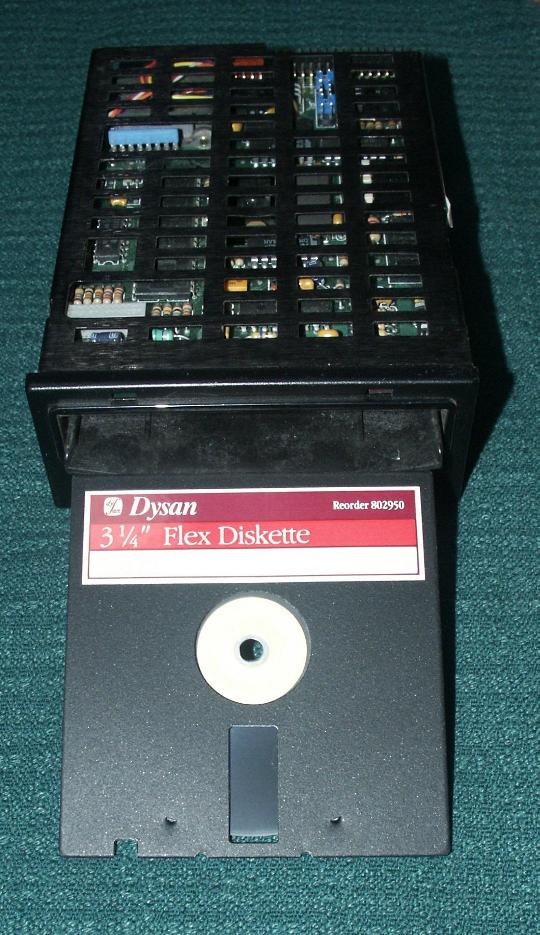
Script error: No such module "Check for unknown parameters".
Further reading
- Weyhrich, Steven (2005). "The Disk II": A detailed essay describing one of the first commercial floppy disk drives (from the Apple II History website).
- Immers, Richard; Neufeld, Gerald G. (1984). Inside Commodore DOS: The Complete Guide to the 1541 Disk Operating System. Datamost & Reston Publishing Company (Prentice-Hall). Template:ISBN.
- Englisch, Lothar; Szczepanowski, Norbert (1984). The Anatomy of the 1541 Disk Drive. Grand Rapids, Michigan, USA, Abacus Software (translated from the original 1983 German edition, Düsseldorf, Data Becker GmbH). Template:ISBN.
- Hewlett Packard: 9121D/S Disc Memory Operator's Manual; printed 1 September 1982; part number 09121-90000.
External links
- HowStuffWorks: How Floppy Disk Drives Work
- Computer Hope: Information about computer floppy drives
- NCITS (mention of ANSI X3.162 and X3.171 floppy standards)
- The Floppy User Guide -historical technical material
- Summary of Floppy Disk Types and Specifications Template:Webarchive
Script error: No such module "Navbox". Template:Basic computer components Template:Ecma International Standards